ENISA's Secure Update Mechanisms Advisory: A CRA Guide
A practical guide to ENISA's Secure Update Mechanisms advisory: the CRA update obligations, 7 threats, the controls that counter them, and a worked example.

In this article
- Summary
- What the advisory is, and what it is not
- The update lifecycle, in seven steps
- How updates actually reach the device
- Seven ways the update channel gets attacked
- STRIDE at a glance
- The controls, grouped the way ENISA groups them
- How teams build this with open-source tools
- Build the updater in dependency order
- A worked example: shipping a thermostat patch
- What this means for your CRA file
- Frequently Asked Questions
- Next Steps
ENISA's public consultation on its second product-security technical advisory, Secure Update Mechanisms, closed on 10 July 2026. This guide covers the May 2026 draft. Check ENISA's publications page for a later version.
Here is why it matters. The advisory takes the Cyber Resilience Act's requirement to deliver secure updates and breaks it into seven steps, each tied to a real-world failure. Four were attacks: SolarWinds, ASUS, Notepad++, and Trivy. One, the 2024 CrowdStrike outage, was a faulty release rather than an attack. ENISA then maps each step to controls that reduce the likelihood or impact of that threat or failure. This guide pulls out the parts a micro, small, or medium manufacturer needs, ties them to your CRA obligations, adds our own view on tooling and what to prioritise, and walks through the thermostat example ENISA uses to tie it together.
Summary
- ENISA published the Secure Update Mechanisms advisory as a draft (Version 0.1) in May 2026. It is the second in its product-security series, after the Secure Use of Package Managers advisory finalised in March 2026.
- The advisory is technology-agnostic. It is consistent with The Update Framework (TUF), Uptane, and NIST SP 800-40, but it does not require any of them.
- It models the update lifecycle in 7 steps across 3 trust domains, lists the threat at each step with a real incident, and maps everything to 36 recommendations in 4 groups.
- It ties directly to CRA Annex I update obligations: timely security updates, secure distribution, prompt dissemination, integrity protection, and automatic updates with user controls.
- It is not legal advice and not a presumption of conformity. It also does not tell you how to fix the underlying bug.
- A worked thermostat firmware example shows two-level signing, a signed manifest, TLS discovery, five device-side checks, and A/B atomic install with rollback.
- The public consultation, run by survey, closed on 10 July 2026.
Source: ENISA Technical Advisory on Secure Update Mechanisms, draft Version 0.1, May 2026.
What the advisory is, and what it is not
The ENISA Technical Advisory on Secure Update Mechanisms is a draft dated May 2026, labelled Version 0.1 in its page headers. The published file is named v0.6, which appears to be a typo. ENISA opened it for public consultation with a feedback survey that closed on 10 July 2026.
It targets manufacturers of products with digital elements, and in particular the teams that design, build, or operate update mechanisms. ENISA wrote it for micro, small, and medium manufacturers who need to understand common update threats and apply a set of controls without standing up a large security team.
Be clear about its limits. ENISA states three of them directly:
The advisory is not legal advice, not a formal interpretation of the CRA, and not a presumption of conformity. It also does not cover how to develop or validate the patch itself, including root cause analysis. Compliance with Regulation (EU) 2024/2847 stays the manufacturer's responsibility.
What it does give you is a shared map. The same seven-step lifecycle runs through the threats section and the controls section, so a control always points back to the threat it answers.
The update lifecycle, in seven steps
ENISA describes any update, whether firmware, a binary, a delta patch, a signature file, or a config change, as moving through the same seven steps. Five actors carry them: the producer (manufacturer), the publication service, the update repository, the client updater, and the endpoint.
The seven steps run across three trust zones. The producer trust domain is where the update is built and signed. The distribution domain, which includes repositories and CDNs, is treated as less trusted. The device trust domain is where the update is verified and installed.
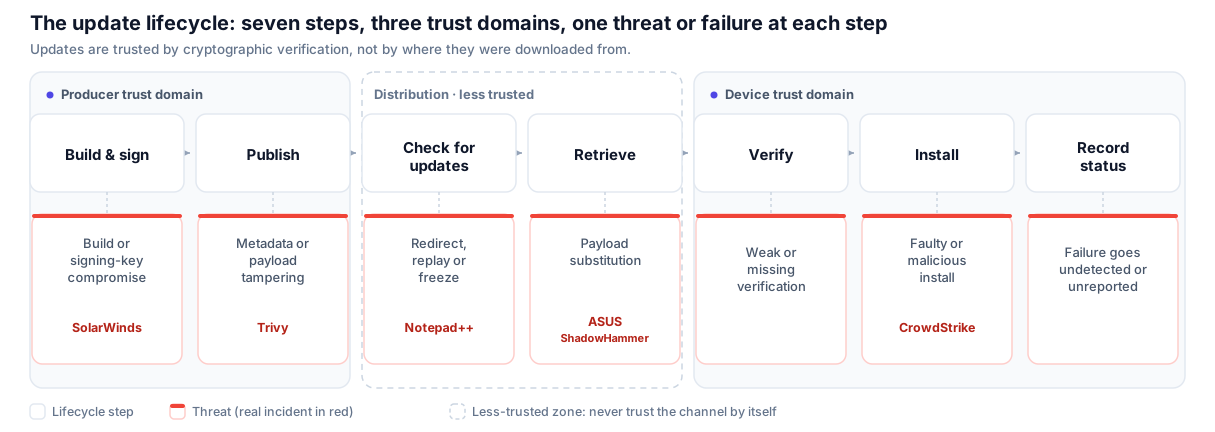
The single most useful idea in the document sits behind that diagram.
The device is provisioned with a root public key as its trust anchor. An update is accepted because cryptographic verification passes, not because of where it was downloaded from. Even if a CDN or mirror is compromised, an unauthorised or modified update should be rejected at the device.
How updates actually reach the device
The lifecycle is the same everywhere. Who runs each step is not. ENISA names four delivery models, and the model decides where your controls have to live. The matrix below shows who runs each step, so you can see which cells are yours to build.
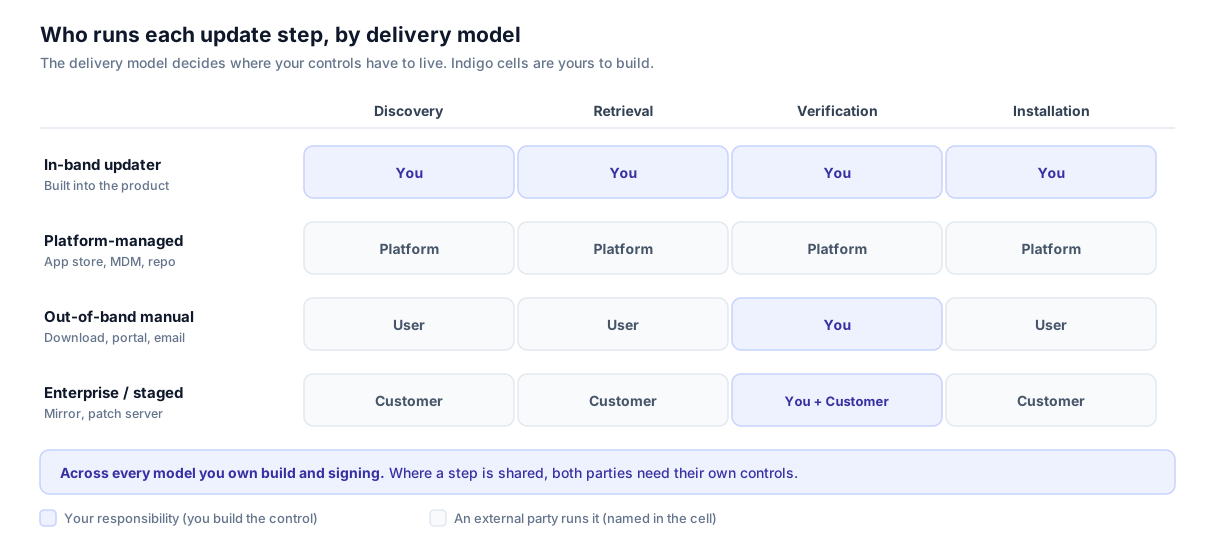
The examples ENISA gives: in-band covers desktop app updaters, in-product plugin updaters, and browser auto-update. Platform-managed covers mobile app stores, Linux package repositories, MDM platforms, and browser extension stores. Out-of-band manual covers an installer from a vendor website, a patch via a secure portal, or an emailed package. Enterprise or staged covers WSUS-like staging, enterprise mirrors, patch management servers, and air-gapped transfer.
For simple designs, ENISA describes a device that trusts a root public key plus one operational signing key. More advanced designs use separate signing roles, and higher-assurance deployments add threshold signatures, where more than one key holder must approve a sensitive change. TUF and Uptane formalise that role separation. You do not have to adopt either to meet the baseline.
Seven ways the update channel gets attacked
This is the part to read twice. ENISA walks each lifecycle step, states the threat, the impact, and a real incident. The pattern is consistent: a compromise early in the chain stays invisible if later steps treat everything as normal. The table below is the advisory's section 3, condensed, with the primary control added from its section 4.
| Step | What goes wrong | Real incident | Primary control |
|---|---|---|---|
| 1. Build & sign | Build pipeline or signing keys compromised, malicious code embedded in signed artefacts | SolarWinds: malicious code inserted into the build environment and shipped in signed updates | Trusted build environment, key protection in an HSM, provenance |
| 2. Publish | Update metadata or payloads manipulated during publication, legitimate files replaced or withheld | Trivy: release and distribution processes targeted to push compromised artefacts through trusted channels | Pre-release validation, controlled release workflow, metadata integrity |
| 3. Check for updates | Redirection, DNS hijacking, fake update services, replay of old metadata, or freeze attacks that hide newer fixes | Notepad++: update discovery hijacked so selected users contacted an attacker-controlled source | Trusted update source, metadata freshness validation |
| 4. Retrieve | Download interfered with, malicious or corrupted artefacts delivered from repositories, mirrors, or CDNs | ASUS Live Update (ShadowHammer, 2019): malicious artefacts pushed through the normal download channel to specific users | Strong transport security (TLS), treat CDNs as untrusted, integrity check |
| 5. Verify | Weak or missing signature, trust-chain, hash, version, or applicability checks let bad updates pass as valid | Notepad++ later strengthened installer verification after the hijack | Signature verification, integrity enforcement, anti-rollback |
| 6. Install | Malicious code runs with elevated privileges, or a faulty update breaks the device | CrowdStrike Falcon outage (2024): a faulty, non-malicious update caused widespread crashes | Atomic install, safe-update testing, recovery and rollback |
| 7. Record status | Logging, monitoring, or alerting absent, disabled, or suppressed, so problems go unnoticed | The CrowdStrike outage showed why fast visibility into failures and affected endpoints matters at scale | Update status recording, secure logging, failure reporting |
The threat model ENISA assumes is broad. Attackers may target build pipelines, signing keys, publication services, repositories, CDNs, DNS, metadata replay, client-side update state, or the installation workflow. The mix of malicious cases (SolarWinds, ASUS) and a non-malicious one (CrowdStrike) is deliberate. A secure update mechanism has to survive both an attacker and a bad release.
STRIDE at a glance
The advisory's Annex 1 maps the threats to Microsoft STRIDE categories. It is an indicative mapping, not exhaustive, and several threats span more than one category. If you run one threat-modelling session this year, use this table as the agenda: walk your update channel stage by stage and ask which STRIDE category bites hardest at each. For a lean team, the Tampering and Spoofing rows at the Retrieve and Check steps deserve the most time, because that is where the ASUS and Notepad++ attacks landed.
| Lifecycle stage | STRIDE categories |
|---|---|
| Build / package / establish trust | Tampering, Spoofing, Elevation of privilege |
| Publish | Tampering, Spoofing, Denial of service |
| Check for updates | Spoofing, Tampering, Denial of service |
| Retrieve | Tampering, Spoofing, Denial of service |
| Verify | Spoofing, Tampering |
| Install | Elevation of privilege, Tampering, Denial of service |
| Record status | Repudiation, Tampering, Denial of service |
The controls, grouped the way ENISA groups them
Section 4 gathers the controls into four stages and aligns them with the ENISA Secure by Design and Default playbook. The full advisory lists 36 named recommendations. The tables below keep the highest-value ones per stage. Read the source for the complete set.
Preparation and publication
This stage covers building, authorising, and publishing the update and its metadata.
| Recommendation | What it means |
|---|---|
| Secure signing practices | Sign update metadata with strong cryptography, and bind the artefact to that metadata. |
| Key protection and management | Store signing keys in an HSM, restrict access, separate key roles, and rotate or revoke on suspected compromise. |
| Provenance and traceability | Keep traceability from source to release. Higher-assurance teams use SLSA provenance or in-toto attestations. |
| Dependency check | Check third-party and external components for known vulnerabilities before release. Your SBOM feeds this. |
| Update structuring | Design releases so security updates ship independently of functional changes, and can install automatically by default where possible. |
| Advisory linkage | Release the update with clear information on the vulnerability, its severity, and remediation, so users understand the urgency. |
| Safe update behaviour testing | Test that updates install without breaking the device, and that rollback or recovery works on failure. |
Discovery and retrieval
This stage decides how clients find and download updates without being redirected or fed stale data.
| Recommendation | What it means |
|---|---|
| Trusted update source | Obtain update information only from authorised, authenticated endpoints. |
| Strong transport security | Use TLS for discovery and retrieval, with no fallback to insecure protocols. |
| Separation of trust domains | Treat CDNs, mirrors, and intermediaries as untrusted. Their compromise must not be enough to push a modified update. |
| Metadata freshness validation | Use expiry, timestamp, version, or monotonic sequence numbers to reject stale, replayed, or frozen metadata. |
| Support for automated retrieval | Turn on automatic discovery and retrieval by default, with controls to postpone but not to block critical security updates. |
Verification and installation
This is the primary trust-decision point. If it fails, earlier compromises become valid updates.
- Signature verification. Verify the authenticity of metadata, and confirm the artefact is cryptographically bound to it.
- Applicability validation. Confirm the update fits this product, version, and configuration before installing.
- Integrity enforcement. Validate the artefact hash and reject any corrupted or modified content before install.
- Version control and anti-rollback. Block installation of older or unauthorised versions using rollback counters or monotonic sequence numbers.
- Authorised installation context. Only trusted, authorised components may start and run the install, with least-privilege restrictions. This is the control for the elevated-privilege threat at the install step.
- Atomic update behaviour. The system transitions fully to the new version or safely stays on the previous one, with recovery on failure.
Observability and recovery
This stage records outcomes, surfaces failures, and lets the device recover.
| Recommendation | What it means |
|---|---|
| Update status recording | Record the outcome of each operation: success, failure, rollback, or partial install. |
| Secure logging | Protect update logs against tampering and unauthorised access. |
| Integrity failure reporting | Detect and report failures in signature, integrity, or metadata validation. |
| Recovery and rollback | Recover from failed updates, including reverting to a known-good version. |
| Trust anchor and key recovery | Support secure rotation or replacement of signing keys on compromise. |
How teams build this with open-source tools
ENISA keeps the advisory technology-agnostic and names frameworks and guidance such as TUF, Uptane, SLSA, in-toto, and NIST SP 800-40, without recommending specific tools. That is the right call for a regulator, but it leaves the practical question open. The mapping below is ours, not ENISA's. None of these tools is a compliance certificate. They implement the engineering. You still own the evidence.
| Control group | Open-source tools and frameworks | What they give you |
|---|---|---|
| Build, provenance, dependency check | Syft, Grype, Trivy and OSV-Scanner, plus the SLSA framework with in-toto attestations (produced by tools such as Tekton Chains or SLSA generators) | Generate an SBOM, scan dependencies for known vulnerabilities, and produce signed build provenance from source to artefact. |
| Sign metadata and artefacts | Sigstore (cosign), The Update Framework (python-tuf, go-tuf), Notary / Notation | Sign update metadata and bind the artefact to it. Sigstore adds a public transparency log. TUF adds signing roles and freshness metadata. |
| Protect signing keys | SoftHSM for testing, and Sigstore Fulcio and Rekor for keyless signing, backed by a PKCS#11 HSM or cloud KMS for production keys | Keep signing keys off build machines and keep a record of what was signed and when. |
| On-device update clients | Mender, RAUC, SWUpdate, OSTree | Verify a signed update on the device, install to a redundant slot or deployment, and roll back on failure. How the update reaches the device depends on how you integrate them. |
| Rollout orchestration and frameworks | Eclipse hawkBit (server-side rollout to a fleet), Uptane (automotive secure-update framework) | Manage and stage delivery to many devices. These are not on-device installers. |
| Advisory and remediation linkage | OpenVEX, CSAF, CycloneDX VEX | Publish machine-readable vulnerability and exploitability statements next to the update. |
For an embedded product, a maintained A/B framework like Mender, RAUC, SWUpdate, or OSTree can give you signed images, on-device verification, atomic install, and rollback, once configured for your update model. That covers most of steps 4 to 7 in a dependency you do not have to maintain yourself. The thermostat example below reads like a hand-rolled version of what these tools provide once set up. Spend your own effort on key protection and build provenance, the parts no updater hands you for free.
Build the updater in dependency order
This part is our guidance, not ENISA's. One caveat first: this is not a shortlist to stop at. The CRA requires every essential requirement that applies to your product, based on your risk assessment under Annex I, so the goal is the full set of controls. What follows is the order we would build them in, so a small team is not paralysed by 36 recommendations. The foundation makes the later controls meaningful, so the sequence matters.
- Sign the metadata and verify on the device. Provision a root trust anchor and check the signature before anything installs. Do this first, because every other control assumes the device only accepts authentic updates. Without it, the rest is decoration.
- Lock down transport. TLS for discovery and retrieval, and treat any CDN or mirror as untrusted. This is mostly configuration, so it is cheap, and it closes the ASUS-style retrieval attack.
- Add hash and applicability checks. Small additions at the verify step: confirm the artefact hash matches the signed manifest, and that the update fits this model and version. Low effort once signing is in place.
- Scope anti-rollback early. It is the hardest control to retrofit, because it needs protected counter state and bootloader cooperation, so plan it now even though it lands later. It is the freeze and downgrade defence ENISA stresses most.
- Make installs atomic, with rollback. A/B or redundant slots, so a bad release (the CrowdStrike failure mode) does not brick the device. This is a large lift if hand-rolled, which is why a maintained framework usually wins here.
- Record and report outcomes. A tamper-proof update log and failure reporting, so you can detect a problem and prove what happened. This is also what your CRA evidence draws on.
A worked example: shipping a thermostat patch
ENISA closes with a concrete example, and it is the clearest part of the document. An embedded IoT thermostat at version 1.0.0 needs a security update that patches EUVDB-202X-Y, an input validation flaw. The device uses an in-band updater. The example is illustrative, not a universal blueprint.
The manufacturer runs two signing levels. A root signing authority stays offline and authorises an operational vendor signing key used for routine releases. That split lets the vendor key rotate without changing the device's root trust anchor.
The device ships with the parts shown below.
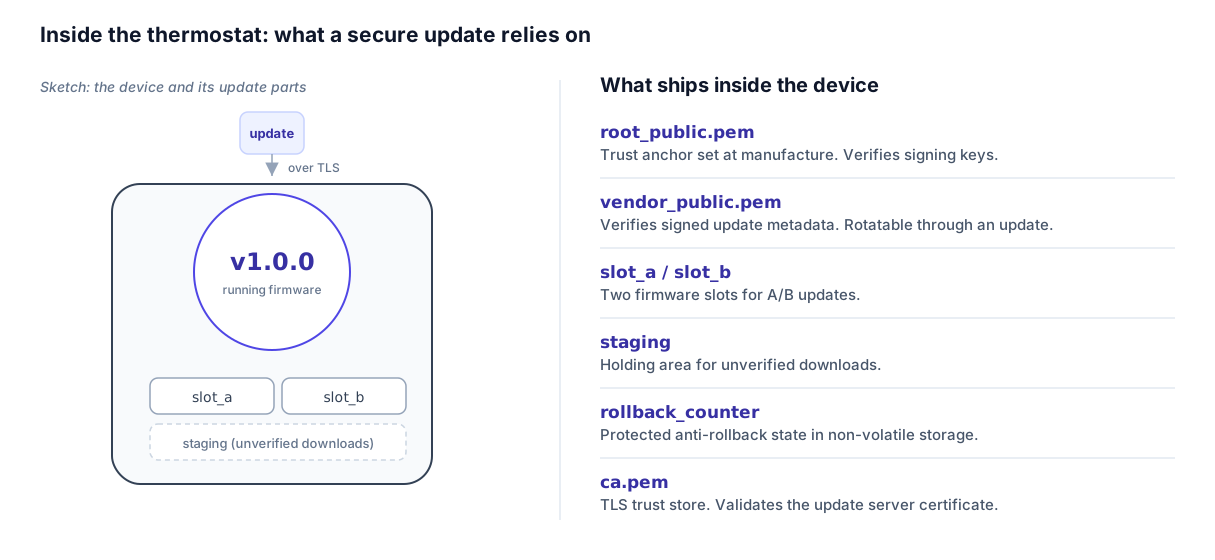
Preparation. The build runs in a controlled environment with only authorised code and dependencies. An SBOM is generated and vulnerability-checked. The manufacturer produces a signed manifest.json carrying the SHA-256 hash and file size, the applicable product and version, freshness and anti-rollback fields (timestamp, expiry, rollback counter), and advisory information (severity, advisory URL). A byte-level change to the package produces a different hash, caught on device.
openssl dgst -sha256 -sign keys/vendor_private.pem \
  -out repo/manifest.json.sig repo/manifest.json
Discovery. The thermostat checks for updates over TLS, validating the server certificate against ca.pem. The update_type and severity fields let it tell a security update from a routine release and notify the user accordingly. Downloads land in staging, so a power loss mid-download never touches the running firmware.
curl --tlsv1.2 --cacert /etc/ssl/certs/ca.pem \
  https://updates.acme.com/device/manifest.json -o manifest.json
Verification and install. Before installing, the device runs five checks in order. If any fails, it aborts.
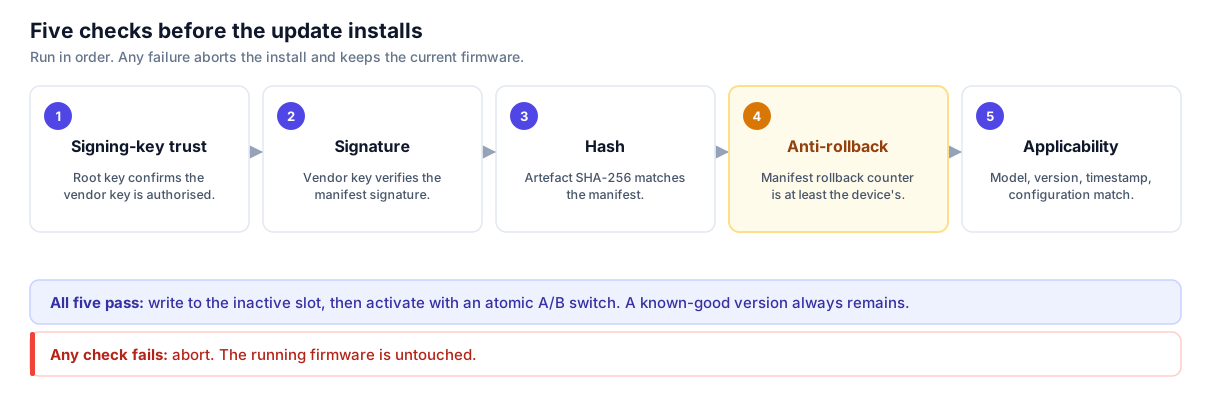
The anti-rollback check carries the most weight. The device's rollback counter only goes up after new firmware boots and passes its health checks, so a failed or malicious update cannot quietly raise the floor and lock out a later fix. On success, the firmware writes to the inactive slot and activates with an atomic slot switch, so a known-good version always remains. Observability records every attempt in a permission-restricted update.log with timestamp and status. If the vendor key is ever compromised, the manufacturer signs and ships a new vendor key that the root key authorises. The root key is never updated through this channel. Root compromise needs a separate secure process such as factory reset.
What this means for your CRA file
The advisory's final table pairs each security claim with example evidence and artefacts. That mapping is the bridge to your technical documentation. The CRA's technical documentation asks for both: a description of your secure-update solution (Annex VII) and the evidence behind it, including an SBOM and test reports. A description with nothing behind it is the weak spot.
This is our take, not ENISA's. For an SME with limited time, this table is the part of the advisory to act on first. The CRA's technical documentation (Article 31 and Annex VII) wants a description of your update solution plus the evidence behind it: test reports, an SBOM, and artefacts. Most teams can write the description. The harder question is whether you can produce the evidence for each claim today. That is where we would put the first hour.
The example's security claims, and the evidence that backs each one, look like this.
| What you can claim | Evidence to keep |
|---|---|
| The update can be trusted (origin and composition) | Build logs, SBOM, SCA results, CI/CD records |
| Protected from unauthorised release or impersonation | Signed manifest, root and vendor public keys, signing logs |
| Security fixes deploy without operational delay | Security-only release notes, manifest fields |
| The update channel is authenticated and private | ca.pem, TLS settings |
| Protected against being frozen on a vulnerable version | Freshness checks, expiry, version validation logs |
| Verified before activation, protected against downgrade | Public keys, signature files, anti-rollback state |
| Failures are detected and recoverable | update.log, health-check logs, rollback records |
Each row supports one or more CRA Annex I requirements, from integrity and secure distribution to monitoring and availability. See the CRA security update requirements for the article-level detail.
If you cannot produce the right-hand column today, that gap is your work item. A VEX record and an SBOM-driven dependency check cover two of these rows directly. Your supplier due diligence covers the build-trust row for components you did not write.
Frequently Asked Questions
Is the ENISA Secure Update Mechanisms advisory mandatory?
No. It is a draft technical advisory, not legal advice, and ENISA states it is not a presumption of conformity. The binding obligations live in the CRA, mainly Annex I update requirements. The advisory helps you meet them in practice, but a market surveillance authority assesses you against Regulation (EU) 2024/2847, not against this document.
How is this different from the ENISA Secure by Design playbook?
The Secure by Design and Default playbook covers the whole product across 22 principles and the full lifecycle. This advisory zooms into one subsystem, the update channel, and goes deep on its seven steps, threats, and controls. Read the playbook for product-wide principles and this advisory when you design or audit the updater itself.
Which CRA requirements does a secure update mechanism satisfy?
A secure update mechanism is how you meet the CRA's update obligations in Annex I. In plain terms, it lets you show that you can ship security fixes quickly, deliver them over a channel that cannot be tampered with, protect them from corruption, let users receive them automatically while keeping some control, and tell users when an update matters. The build, distribute, verify, and recover controls in this advisory line up with each of those. See the CRA security update requirements for the article-level detail.
Do I have to implement TUF or Uptane?
No. The advisory is technology-agnostic and only says its recommendations are consistent with TUF, Uptane, and NIST SP 800-40. The baseline is a device trust anchor, signed metadata, verification on the device, and anti-rollback. TUF and Uptane formalise multiple signing roles and freshness metadata for higher-assurance designs, so adopt them if your risk profile calls for it.
What is anti-rollback and why does the advisory stress it?
Anti-rollback stops an attacker from forcing a device back onto an older, vulnerable, but still validly signed version. That is a freeze or downgrade attack, and it appears at the check, verify, and install steps. The thermostat example uses a rollback counter held in protected storage and only increased after new firmware boots and passes health checks. Without it, a signed-but-old update sails through signature verification.
Can I still give feedback to ENISA?
ENISA ran a public survey until 10 July 2026, and it is now closed. Watch ENISA's publications page for the next version of the advisory. You can read the draft advisory PDF on the ENISA website. If you ship updates to products with digital elements, your real-world delivery model is exactly what ENISA asked manufacturers to weigh in on.
This article is for informational purposes only and does not constitute legal advice. For specific compliance guidance, consult with qualified legal counsel.
Related Articles
Does the CRA apply to your product?
Answer up to 11 simple questions to find out if your product falls under the EU Cyber Resilience Act scope. Get your result in under 2 minutes.
Ready to achieve CRA compliance?
Start managing your SBOMs and compliance documentation with CRA Evidence.