VEX for CRA: Vulnerability Exploitability eXchange Guide
How to use VEX (Vulnerability Exploitability eXchange) for CRA compliance: formats, status types, SBOM integration, and practical examples.

In this article
Not every vulnerability in your SBOM affects your product. VEX (Vulnerability Exploitability eXchange) lets you communicate which vulnerabilities actually apply to your specific product and context. For CRA compliance, VEX helps demonstrate you've assessed vulnerabilities and addressed those that matter.
This guide explains how to use VEX effectively.
Info: VEX (Vulnerability Exploitability eXchange) lets you communicate which vulnerabilities in your SBOM actually affect your product -- and which do not. It is essential for meeting the CRA's "no known exploitable vulnerabilities" requirement.
Summary
- VEX = machine-readable statement about vulnerability applicability
- Answers: "Does CVE-XXXX affect MY product?"
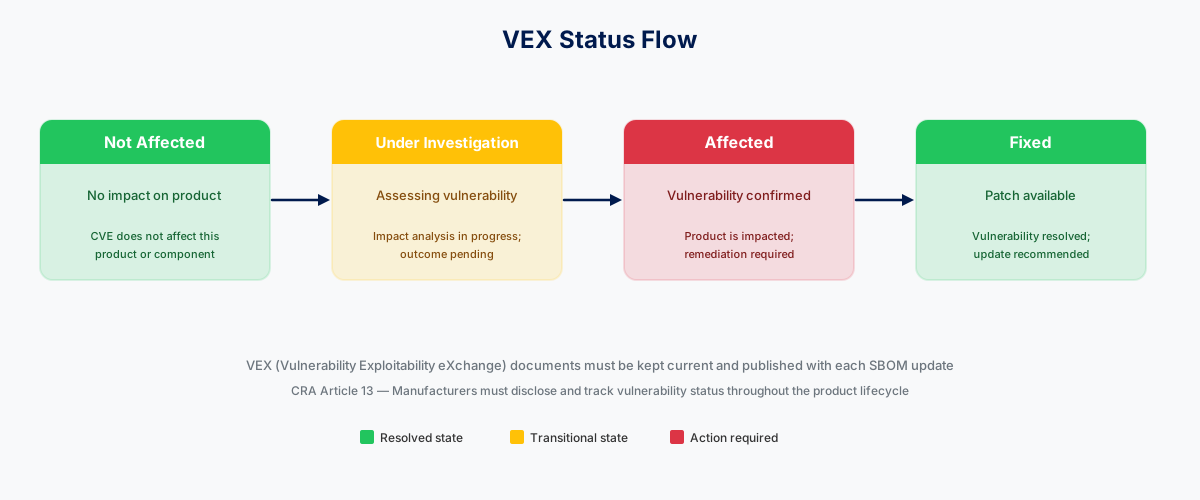
- Four statuses: Not Affected, Affected, Fixed, Under Investigation
- Complements SBOM: SBOM lists components, VEX assesses vulnerabilities
- CycloneDX VEX and CSAF VEX are main formats
- Essential for CRA "no known exploitable vulnerabilities" requirement
What Is VEX?
The Problem VEX Solves
When you scan an SBOM, you get a list of vulnerabilities in components:
SBOM SCAN RESULTS (Typical):

Component: openssl 1.1.1k
  - CVE-2021-3711 (Critical)
  - CVE-2021-3712 (High)
  - CVE-2022-0778 (High)

Component: zlib 1.2.11
  - CVE-2018-25032 (High)

Component: libxml2 2.9.10
  - CVE-2021-3517 (High)
  - CVE-2021-3518 (High)
  - CVE-2022-23308 (Medium)

TOTAL: 8 vulnerabilities found

BUT WAIT...
- Do all these actually affect your product?
- Is the vulnerable code path used?
- Have you already mitigated some?
- Are some not exploitable in your context?
VEX answers these questions.
VEX Definition
VEX (Vulnerability Exploitability eXchange) is a standardized format for communicating:
- Whether a vulnerability affects a specific product
- Why or why not
- What actions (if any) are needed
- Current status of assessment
VEX Status Types
VEX STATUS OPTIONS

NOT AFFECTED:
"This vulnerability does not affect our product"
- Vulnerable code not present
- Vulnerable function not called
- Platform not applicable
- Mitigated by configuration

AFFECTED:
"This vulnerability affects our product"
- Requires action
- May include recommended mitigations
- Indicates severity in context

FIXED:
"This vulnerability was fixed"
- In specific version
- Details of fix provided
- Update recommendation

UNDER INVESTIGATION:
"We're still assessing this"
- Status not yet determined
- Investigation ongoing
- Temporary status
VEX and CRA Requirements
CRA Vulnerability Requirements
CRA requires manufacturers to:
- No known exploitable vulnerabilities (at market placement)
- Handle vulnerabilities throughout support period
- Provide security updates to fix vulnerabilities
- Report actively exploited vulnerabilities: 24h early warning, 72h notification, 14-day final report
- Report severe incidents: 24h early warning, 72h notification, 1-month final report
How VEX Supports CRA
VEX FOR CRA COMPLIANCE

REQUIREMENT: No known exploitable vulnerabilities

VEX ROLE:
- Document vulnerability assessment
- Show which CVEs were evaluated
- Demonstrate "not affected" determinations
- Evidence for technical file

REQUIREMENT: Handle vulnerabilities

VEX ROLE:
- Track vulnerability status changes
- Document "affected" → "fixed" progression
- Communicate with customers
- Maintain audit trail

REQUIREMENT: Security updates

VEX ROLE:
- Document what's fixed in each update
- Provide "fixed in version X" information
- Customer communication tool

REQUIREMENT: ENISA reporting

VEX ROLE:
- Pre-assessment helps determine reportability
- "Affected" + "actively exploited" = report
- Documentation for report accuracy
Tip: CycloneDX has native VEX support. If you are already generating CycloneDX SBOMs, adding VEX data is straightforward.
VEX Formats
CycloneDX VEX
CycloneDX includes VEX capability as part of the SBOM format:
{
  "bomFormat": "CycloneDX",
  "specVersion": "1.5",
  "vulnerabilities": [
    {
      "id": "CVE-2021-3711",
      "source": {
        "name": "NVD"
      },
      "analysis": {
        "state": "not_affected",
        "justification": "code_not_present",
        "detail": "Our product uses OpenSSL but does not use SM2 functionality where this vulnerability exists. SM2 is not compiled in our build."
      },
      "affects": [
        {
          "ref": "openssl-1.1.1k"
        }
      ]
    },
    {
      "id": "CVE-2022-0778",
      "source": {
        "name": "NVD"
      },
      "analysis": {
        "state": "exploitable",
        "detail": "Product is affected when parsing untrusted certificates. Fixed in version 2.1.0."
      },
      "affects": [
        {
          "ref": "openssl-1.1.1k"
        }
      ],
      "recommendation": "Update to product version 2.1.0 or later"
    }
  ]
}
CSAF VEX
CSAF (Common Security Advisory Framework) provides a standalone VEX document format:
{
  "document": {
    "category": "csaf_vex",
    "title": "Product Security Assessment for CVE-2021-3711",
    "publisher": {
      "category": "vendor",
      "name": "Example Corp"
    },
    "tracking": {
      "id": "EX-2024-001",
      "status": "final",
      "version": "1.0.0",
      "current_release_date": "2024-01-15T10:00:00Z"
    }
  },
  "product_tree": {
    "branches": [
      {
        "category": "product_name",
        "name": "Smart Sensor Pro",
        "product": {
          "product_id": "SSP-2.0",
          "name": "Smart Sensor Pro 2.0"
        }
      }
    ]
  },
  "vulnerabilities": [
    {
      "cve": "CVE-2021-3711",
      "product_status": {
        "known_not_affected": ["SSP-2.0"]
      },
      "flags": [
        {
          "label": "vulnerable_code_not_present",
          "product_ids": ["SSP-2.0"]
        }
      ],
      "notes": [
        {
          "category": "description",
          "text": "SM2 functionality is not included in our OpenSSL build."
        }
      ]
    }
  ]
}
OpenVEX
OpenVEX is a simpler, focused VEX format:
{
  "@context": "https://openvex.dev/ns/v0.2.0",
  "@id": "https://example.com/vex/2024-001",
  "author": "Example Corp Security Team",
  "timestamp": "2024-01-15T10:00:00Z",
  "statements": [
    {
      "vulnerability": {
        "@id": "CVE-2021-3711"
      },
      "products": [
        {
          "@id": "pkg:generic/smart-sensor-pro@2.0"
        }
      ],
      "status": "not_affected",
      "justification": "vulnerable_code_not_present",
      "impact_statement": "SM2 cryptographic functionality is not compiled into our product's OpenSSL build."
    }
  ]
}
Creating VEX Statements
Assessment Process
VEX ASSESSMENT WORKFLOW

STEP 1: IDENTIFY VULNERABILITY
- From SBOM scan results
- From security advisory
- From customer report
- From ENISA notification

STEP 2: ANALYZE APPLICABILITY
Questions to answer:
- Is the vulnerable component in our product?
- Is the vulnerable version present?
- Is the vulnerable code path used?
- Is the vulnerability exploitable in our context?
- Are mitigations already in place?

STEP 3: DETERMINE STATUS
Based on analysis:
- NOT_AFFECTED: Vulnerability doesn't apply
- AFFECTED: Vulnerability applies, action needed
- FIXED: Was affected, now remediated
- UNDER_INVESTIGATION: Still assessing

STEP 4: DOCUMENT JUSTIFICATION
For NOT_AFFECTED, specify why:
- vulnerable_code_not_present
- vulnerable_code_cannot_be_controlled_by_adversary
- vulnerable_code_not_in_execute_path
- inline_mitigations_already_exist

STEP 5: CREATE VEX DOCUMENT
- Use chosen format
- Include all required fields
- Version and date the document
- Sign if possible
Justification Types
NOT_AFFECTED JUSTIFICATIONS

VULNERABLE_CODE_NOT_PRESENT:
"The vulnerable code is not included in our build"
Example: OpenSSL compiled without SM2 support

VULNERABLE_CODE_CANNOT_BE_CONTROLLED_BY_ADVERSARY:
"An attacker cannot reach the vulnerable code"
Example: Function only called with trusted internal data

VULNERABLE_CODE_NOT_IN_EXECUTE_PATH:
"The vulnerable function is never called"
Example: Library included but specific function unused

INLINE_MITIGATIONS_ALREADY_EXIST:
"Other controls prevent exploitation"
Example: WAF blocks the attack vector, sandboxing limits impact
Example Assessments
EXAMPLE 1: Not Affected (Code Not Present)

Vulnerability: CVE-2021-3711 (OpenSSL SM2 buffer overflow)
Component: openssl 1.1.1k
Assessment: Our product uses OpenSSL for TLS only.
            SM2 is a Chinese cryptographic standard we don't use.
            Our build explicitly disables SM2: ./config no-sm2
Status: NOT_AFFECTED
Justification: vulnerable_code_not_present

EXAMPLE 2: Not Affected (Not in Execute Path)

Vulnerability: CVE-2022-23308 (libxml2 use-after-free)
Component: libxml2 2.9.10
Assessment: Vulnerability in XPath evaluation with namespaces.
            Our product only uses libxml2 for simple XML parsing.
            We never use XPath functionality.
Status: NOT_AFFECTED
Justification: vulnerable_code_not_in_execute_path

EXAMPLE 3: Affected

Vulnerability: CVE-2022-0778 (OpenSSL infinite loop)
Component: openssl 1.1.1k
Assessment: Our product processes TLS certificates from
            potentially untrusted sources. The vulnerability
            allows DoS via malicious certificate.
Status: AFFECTED
Recommendation: Update to product version 2.1.0 (OpenSSL 1.1.1n)

EXAMPLE 4: Fixed

Vulnerability: CVE-2022-0778 (OpenSSL infinite loop)
Component: openssl (was 1.1.1k, now 1.1.1n)
Assessment: Fixed in product version 2.1.0
Status: FIXED
Fixed Version: 2.1.0
VEX Workflow for CRA
Continuous Assessment
ONGOING VEX PROCESS

DAILY/WEEKLY:
1. Scan SBOM for new vulnerabilities
2. Prioritize by severity
3. Begin assessment of high/critical

FOR EACH VULNERABILITY:
1. Technical analysis
2. Determine status
3. Create/update VEX statement
4. If AFFECTED: plan remediation

WHEN FIXED:
1. Update VEX status to FIXED
2. Reference fix version
3. Notify customers
4. Update technical file

FOR ENISA REPORTING:
1. AFFECTED + actively exploited → Report: 24h / 72h / 14-day final
2. AFFECTED + severe incident → Report: 24h / 72h / 1-month final
3. Include VEX in report context
Integration with SBOM
SBOM + VEX INTEGRATION

OPTION 1: Embedded VEX (CycloneDX)
- VEX data inside SBOM document
- Single file for components + vulnerabilities
- Update SBOM when VEX changes

OPTION 2: Linked VEX
- Separate VEX document
- References SBOM components
- Can update independently

OPTION 3: CSAF Advisories
- Standalone security advisories
- Published on security page
- Machine-readable for automation

RECOMMENDATION FOR CRA:
- Use embedded VEX for technical file (complete record)
- Publish CSAF advisories for customer communication
- Maintain both, keep in sync
Customer Communication
VEX FOR CUSTOMER COMMUNICATION

SCENARIO: Customer asks "Does CVE-XXXX affect your product?"

WITH VEX:
1. Check VEX database for vulnerability
2. Provide status immediately
3. If NOT_AFFECTED: share justification
4. If AFFECTED: provide remediation guidance
5. If UNDER_INVESTIGATION: provide timeline

BENEFITS:
- Consistent answers across support team
- Pre-prepared justifications
- Faster response time
- Demonstrable due diligence
VEX in Technical File
Documentation Approach
TECHNICAL FILE VEX SECTION

SECTION: Vulnerability Assessment (VEX)

CONTENTS:
1. VEX methodology description
2. Current VEX document (all products)
3. Historical VEX updates (audit trail)
4. Not-affected justification evidence

EXAMPLE ENTRY:
"As of [date], the following vulnerabilities have been
assessed for [Product Name] version [X.Y.Z]:

Total CVEs in component dependencies: 47
- Not Affected: 41
- Fixed: 4
- Under Investigation: 2
- Affected (with mitigation): 0

VEX document: [link/attachment]
Last updated: [date]"
Evidence for "No Known Exploitable Vulnerabilities"
CRA COMPLIANCE EVIDENCE

CLAIM: Product has no known exploitable vulnerabilities

EVIDENCE (VEX-based):
1. SBOM scan results (dated)
2. VEX assessment covering all findings
3. For each "Not Affected": justification
4. For each "Fixed": version information
5. For "Under Investigation": timeline/status

AUDIT TRAIL:
- When was each CVE assessed?
- Who performed assessment?
- What was the justification?
- When was status updated?
Tools and Automation
VEX Generation Tools
VEX TOOLING OPTIONS

SBOM + VULNERABILITY MATCHING:
- Grype (Anchore) - applies OpenVEX statements to filter scan results
- Trivy - applies VEX statements (--vex) to filter findings
- OWASP Dependency-Track - VEX support

VEX AUTHORING:
- CycloneDX CLI - create/validate VEX
- CSAF tools - create CSAF VEX documents
- OpenVEX tools - simple VEX creation

AUTOMATION:
- CI/CD integration for scanning
- Automatic "under investigation" status
- Manual review for final status
Automation Strategy
VEX AUTOMATION APPROACH

AUTOMATED:
- SBOM scanning for new CVEs
- Initial "under investigation" status
- Notification to security team
- Basic applicability checks

SEMI-AUTOMATED:
- Code path analysis suggestions
- Historical pattern matching
- Similar product status lookup

MANUAL (Required):
- Final status determination
- Justification writing
- Customer-facing communications
- ENISA reporting decisions
Common Challenges
Challenge: Volume of CVEs
Problem: SBOM scans return hundreds of CVEs.
Solutions:
- Prioritize by severity (Critical/High first)
- Use automation for initial triage
- Build justification templates for common patterns
- Focus on components you control
Challenge: Technical Analysis Difficulty
Problem: Hard to determine if vulnerable code is used.
Solutions:
- Work with development team
- Use static analysis tools
- Document uncertainty appropriately
- Conservative approach: when in doubt, treat as affected
Challenge: Keeping VEX Current
Problem: Vulnerability status changes over time.
Solutions:
- Automate SBOM rescanning
- Scheduled VEX reviews
- Trigger-based updates (new CVE, new version)
- Version your VEX documents
VEX Checklist
VEX IMPLEMENTATION CHECKLIST

SETUP:
[ ] Choose VEX format (CycloneDX VEX recommended)
[ ] Define assessment process
[ ] Assign responsibility
[ ] Set up tooling

INITIAL ASSESSMENT:
[ ] Scan SBOM for vulnerabilities
[ ] Prioritize by severity
[ ] Assess each vulnerability
[ ] Document justifications

ONGOING PROCESS:
[ ] Regular SBOM rescanning schedule
[ ] New CVE monitoring
[ ] Assessment SLA (e.g., Critical: 24h)
[ ] VEX document updates

DOCUMENTATION:
[ ] VEX included in technical file
[ ] Version history maintained
[ ] Justifications detailed
[ ] Customer-facing publication

INTEGRATION:
[ ] Linked to SBOM
[ ] Customer communication process
[ ] ENISA reporting workflow
[ ] Update release notes
Key Resources
VEX RESOURCES

STANDARDS:
CycloneDX VEX: https://cyclonedx.org/capabilities/vex/
CSAF: https://docs.oasis-open.org/csaf/
OpenVEX: https://openvex.dev

GUIDANCE:
CISA VEX Status Justifications
CISA Minimum Requirements for VEX

TOOLS:
Grype: https://github.com/anchore/grype
Trivy: https://aquasecurity.github.io/trivy/
CycloneDX CLI: https://github.com/CycloneDX/cyclonedx-cli
How CRA Evidence Helps
CRA Evidence provides comprehensive VEX support:
- Integrated VEX: Manage VEX alongside SBOM
- Assessment workflow: Structured vulnerability analysis
- Status tracking: Track changes over time
- Justification templates: Common patterns pre-built
- Technical file integration: VEX in compliance documentation
- Customer portal: Share VEX status with customers
Start your CRA compliance at craevidence.com.
Related Articles
- SBOM for CRA Compliance: Complete Guide to Software Bill of Materials -- VEX complements SBOM -- learn how to build the foundation first.
- CRA Vulnerability Reporting: ENISA Notification Requirements -- Understand the 24h/72h reporting obligations for vulnerabilities you classify as "Affected."
- CRA SBOM Generation: Tools and Automation Guide -- Automate SBOM and VEX generation in your CI/CD pipeline.
This article is for informational purposes only and does not constitute legal advice. For specific compliance guidance, consult with qualified legal counsel.
Related Articles
Does the CRA apply to your product?
Answer up to 11 simple questions to find out if your product falls under the EU Cyber Resilience Act scope. Get your result in under 2 minutes.
Ready to achieve CRA compliance?
Start managing your SBOMs and compliance documentation with CRA Evidence.