Customer Portal for product compliance documents
Share approved product compliance documents with named customers by product and version, with controlled access and a clear download history.

In this article
- Summary
- Manufacturers want fewer handoffs
- A provider becomes a risk when evidence cannot move
- Supplier input and customer sharing serve different purposes
- Customers start with the products shared with them
- Each product keeps its shared versions together
- Every version has its own published files
- You choose how versions enter the portal
- The company scope sets the sharing ceiling
- Publish the files that fit the customer relationship
- Tokens keep customer rooms separate
- Download history supports follow-up
- Controlled self-service removes repeated email work
- A simple setup starts with one customer
- Frequently Asked Questions
- Next Steps
From conversations with more than 50 manufacturers, we see a clear preference. Teams are bringing more compliance work in-house. They want fewer providers between their product teams and their evidence.
The Customer Portal is the customer-facing sharing layer in our SaaS platform. Named customers get direct access to approved product files, while your team controls the products, versions, documents, and access period.
Summary
- You stay in control: your team decides what each customer receives
- Evidence stays versioned: customers see files for the product version they use
- Access stays separate: one customer does not see another customer's room
- Sharing stays flexible: publish selected versions or add future eligible versions automatically
- Delivery takes less work: customers download approved files without another email request
- Activity stays visible: access and download events create a clear history
Manufacturers want fewer handoffs
Compliance work often crosses several companies.
A component supplier provides an SBOM. A testing laboratory produces a report. A consultant helps prepare the technical file. A software provider stores part of the record.
External support is useful. The problem starts when the manufacturer loses control of the evidence.
The manufacturer still has to answer customer questions. It also has to maintain the product record after a provider changes.
That is why more teams want the working record in-house. They still buy specialist help, but the evidence returns to their own process.
More than 50 manufacturers have discussed this operating model with us. This is a CRA Evidence field observation, not a representative market survey.
The preferred model is simple.
Suppliers contribute evidence. Manufacturers own the final product record. Customers receive an approved part of that record.
A provider becomes a risk when evidence cannot move
In those conversations, provider problems often begin with unclear delivery terms.
A supplier sends one SBOM at the start of a project. The manufacturer expects an updated file for every component release.
A laboratory sends a PDF without a clear product version. The report then becomes hard to use in a release review.
A consultant keeps the technical file in its own workspace. The manufacturer has no clean export when the contract ends.
The work was completed, but the evidence cannot move.
That creates four common problems:
- Version confusion: nobody can confirm which file belongs to which release
- Slow customer replies: repeated requests restart the search and approval chain
- Provider dependency: one external account becomes the only route to the record
- Poor change history: corrected files replace older copies without a clear trail
Set the delivery rules before work starts.
Name the file, format, product version, update trigger, and delivery date. Add an export step for the end of the relationship.
For software components, define the expected output with the SBOM generation guide. For vulnerability status, agree when the supplier provides a VEX document.
Supplier input and customer sharing serve different purposes
Supplier evidence moves into the manufacturer's record. Customer evidence moves out of it.
The manufacturer sits between both flows.
| Flow | Purpose | External party | Manufacturer action |
|---|---|---|---|
| Supplier input | Build the product record | Provides component evidence and updates | Reviews and links the evidence to a product version |
| Customer sharing | Deliver an approved evidence set | Views or downloads published files | Selects the products, versions, and files |
The separation protects the internal workspace.
Customers do not see supplier requests. They do not see internal review notes. They do not see evidence for unrelated products.
Suppliers do not gain access to customer rooms.
Customers start with the products shared with them
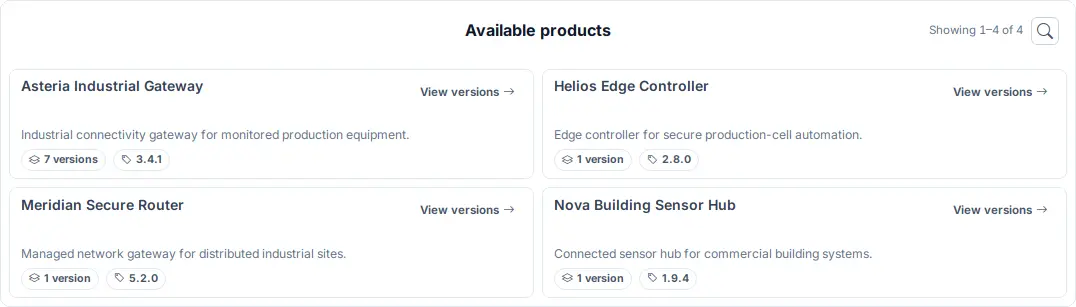
After entering their access token, customers see their available products.
Each card shows the product name, description, shared version count, and latest shared version. The customer can move directly from the catalogue to the relevant product.
Each product keeps its shared versions together
Customers select a shared product from the catalogue. The product page lists every version included in their access scope.
The latest shared version appears first. Older shared versions remain available below it.
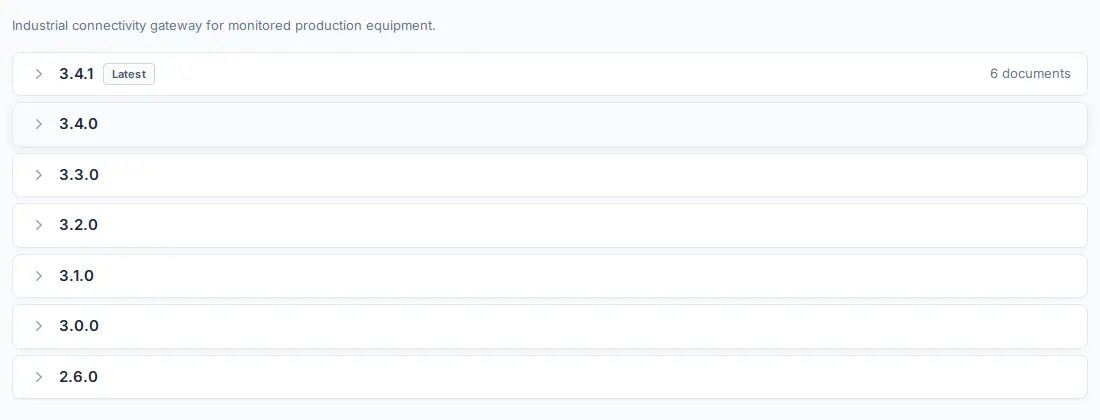
The customer opens the version used in its own environment. This keeps current and older product evidence on one page.
Every version has its own published files
Product evidence often changes between releases.
A test report for version 3.4.1 does not describe version 3.2.0. The same rule applies to risk assessments, architecture documents, SBOMs, and vulnerability status.
The Customer Portal keeps that version boundary visible.
Customers open the version they use. They can download one file or the available bundle.
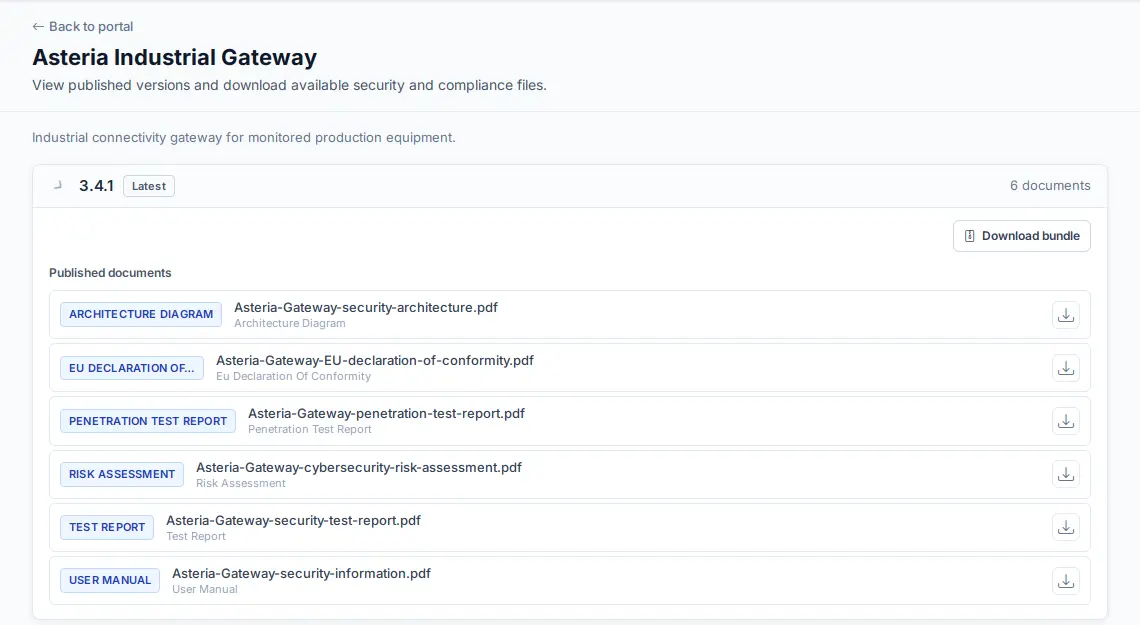
This view keeps the files tied to their product and version.
The product name is clear. The version number is clear. The available files are grouped under that version.
You choose how versions enter the portal
Each product has two sharing options.
Publish selected versions
Choose individual versions when every release needs a final check.
This works well for sensitive products. It also fits contracts that name an exact supported version.
Your team selects the version after reviewing its available evidence.
Include current and future eligible versions
Choose automatic inclusion when the same sharing rule applies across releases.
New eligible versions enter the company sharing scope without another product selection step. Files still follow their normal review and publication state.
Mix both options
One organisation can use both models.
An industrial product can use selected versions. A standard software product can use automatic inclusion.
You do not need one sharing rule for every product line.
The company scope sets the sharing ceiling
The company sharing scope is the largest evidence set available through customer rooms.
Each customer inherits that scope or receives a narrower one. A customer never receives more than the company has approved.
Changing one customer does not change another customer.
This supports different commercial relationships:
| Customer type | Shared evidence |
|---|---|
| Standard customer | The normal evidence set for the product and released versions covered by the agreement. |
| Integration partner | Evidence for the versions embedded in the partner's own product or service. |
| Regulated buyer | The agreed files for procurement review, acceptance, or its supply-chain record. |
A narrower customer scope also reduces accidental over-sharing.
Procurement teams do not need internal notes. Customers do not need evidence for unreleased products.
Publish the files that fit the customer relationship
The available publication set covers common product evidence.
You can share:
- SBOM files linked to the published version
- VEX documents that record vulnerability status
- CSAF security advisories
- generated EU Declarations of Conformity
- generated user information and instructions
- version bundles
- individually selected approved documents
Hardware bills of materials are not part of the current Customer Portal publication set.
Sharing remains a manufacturer decision. The portal does not publish every internal file by default.
Start with the documents customers already request. Add new file types when the commercial relationship needs them.
For SBOM planning, use the CRA SBOM requirements guide.
Tokens keep customer rooms separate
Customer rooms require an access token. They are not anonymous public pages.
Your team creates the token for a named customer. The raw token appears once when created. The platform stores its hash rather than the raw value.
You can set an expiry date. You can rotate the token when a contact changes. You can revoke it when the relationship ends.
This creates a clear access process without adding customer users to the internal manufacturer workspace.
Customers browse the catalogue in their browser. They can also use a machine-readable manifest in an internal workflow.
Download history supports follow-up
The portal records customer activity and downloads.
That history helps answer practical questions:
- Which customer accessed the room
- Which file or bundle was downloaded
- When the download happened
- Which token represented the customer
The history shows delivery activity. It does not prove that the customer read or accepted a document.
Keep acceptance terms in the customer agreement. Use the portal history as the delivery record.
Controlled self-service removes repeated email work
The first customer evidence request often looks small.
Someone finds the files. Someone checks the version. Someone approves the email. Someone sends the attachment.
The same work repeats for the next customer.
The Customer Portal moves that effort to the publication step. After approval, customers retrieve the available evidence themselves.
The manufacturer still controls every shared product and version.
This model works for:
- Procurement evidence packs
- Product integration reviews
- Customer security assessments
- Release-specific document delivery
- Ongoing access during a support contract
A simple setup starts with one customer
Do not begin by publishing the whole portfolio.
Choose one product and one customer.
First, identify the files that customer already requests. Link each file to the correct product version.
Next, set the company sharing scope for that product. Choose selected versions or automatic inclusion.
Then create the customer room. Use a narrower customer scope if the agreement needs it.
Finally, open the room with the issued token. Check the product catalogue, version page, filenames, and bundle.
Repeat the pattern after the first room is correct.
For the wider internal record, use the technical documentation guide.
Frequently Asked Questions
Is the Customer Portal public?
No. Each customer room requires a token. Your team creates the token for a named customer and can set an expiry date, rotate it, or revoke it.
Can two customers receive different files?
Yes. The company scope sets the sharing ceiling. Each customer can inherit that scope or receive a narrower one. Changing one customer does not change another customer's room.
Can future product versions appear automatically?
Yes. Choose the current-and-future eligible version option for that product. Use selected versions when every release needs a separate publication check.
Which files can customers download?
The publication set covers SBOM, VEX, CSAF, generated EU Declarations of Conformity, generated user information and instructions, version bundles, and approved version documents.
Can a customer download the available files together?
Yes. Where the version contains bundle-ready files, the customer can download the available bundle. Individual file downloads remain available from the same version page.
What happens when a supplier does not cooperate?
Record the missing file, product version, requested format, and due date. Escalate through the contract owner and product owner. Add delivery, correction, export, and exit terms before the next engagement.
For informational purposes only. This content does not constitute legal advice. For specific compliance guidance, consult with qualified legal counsel familiar with EU product regulations.
Related Articles
ENISA on Frontier AI: 5 Consequences for the CRA
Does the CRA apply to your product?
Answer up to 11 simple questions to find out if your product falls under the EU Cyber Resilience Act scope. Get your result in under 2 minutes.
Ready to achieve CRA compliance?
Start managing your SBOMs and compliance documentation with CRA Evidence.