CRA Class I Compliance Guide: Routers, Modems and Switches
Summary
A home Wi-Fi router, modem-router, internet modem, mesh router node or switch should normally be planned as an Important Class I product. The caveat is core functionality: a router marketed primarily as a firewall, IDS/IPS, VPN gateway or network-management appliance may need a different category analysis.
The first evidence action is a classification-and-boundary memo for the exact CPE or network device. It should identify the hardware, firmware, WAN interface, wireless stack, LAN admin UI, mobile app, ISP or vendor cloud, remote-management channel, update mechanism, SBOM, support period and any private-label or ISP firmware modification.
| Product variant | Likely CRA class | Why |
|---|---|---|
| Consumer Wi-Fi router | Important Class I | Internet connectivity and routing are the core function |
| ISP modem-router or CPE | Important Class I | The product connects customers to the internet |
| Standalone cable, DSL or fibre modem / ONT | Important Class I when intended for internet connection | Internet modem function is the core product function |
| Mesh Wi-Fi kit | Important Class I | The mesh nodes form the router product or product family |
| 4G/5G mobile hotspot | Important Class I | Cellular WAN is still internet connectivity |
| Managed switch | Important Class I | Switching plus a management plane fits the network-product function and expands the evidence boundary |
| Unmanaged or non-configurable switch | Case-specific | Check whether it is a product with digital elements and whether there is any management plane, firmware update path, cloud/app function or other connected function before treating it like managed network equipment |
| VPN router | Case-specific, usually Important Class I | VPN may be the more specific function if marketed as such |
| Router marketed as firewall, UTM or IPS | Case-specific, possibly Important Class II | Firewall or prevention can become the core function |
| Commercial router firmware sold standalone | Case-specific | The software product may itself be the router product |
| ISP-branded CPE with OEM hardware | Important Class I, role-sensitive | Private-label branding or firmware changes can shift manufacturer duties |
Classification basis
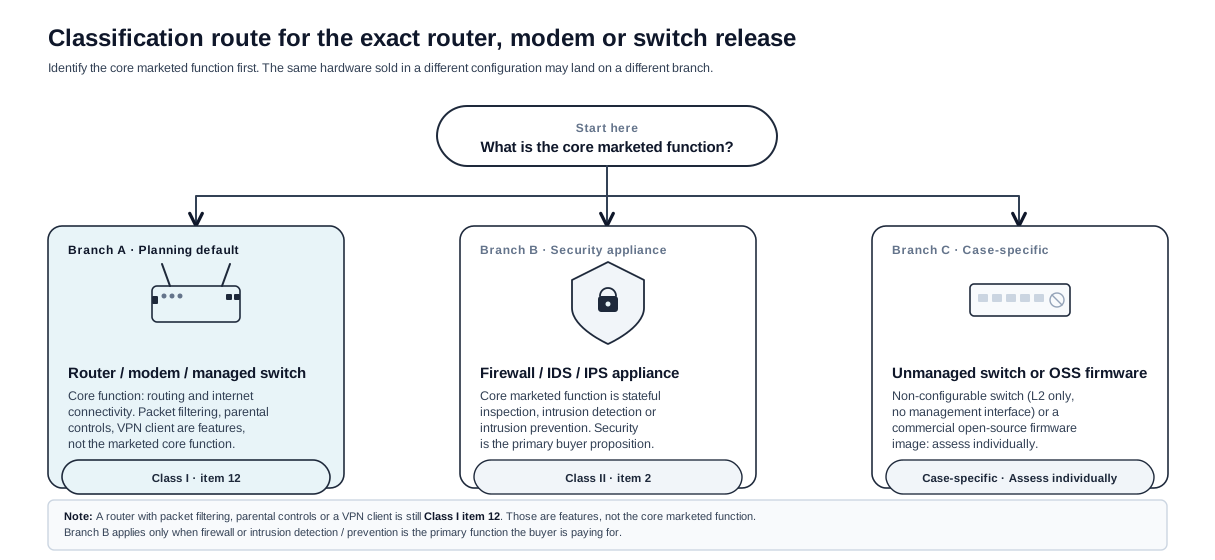
The CRA treats routers, internet modems and switches as Important Class I products, which is not the same as Class II firewall status. Extra security features do not move a router into Class II as long as routing and internet connectivity remain its core marketed function.
The product is not Critical merely because it sits at the network edge. The Critical list is narrower and does not include consumer routers or ISP CPE as a whole.
What counts as the router product?
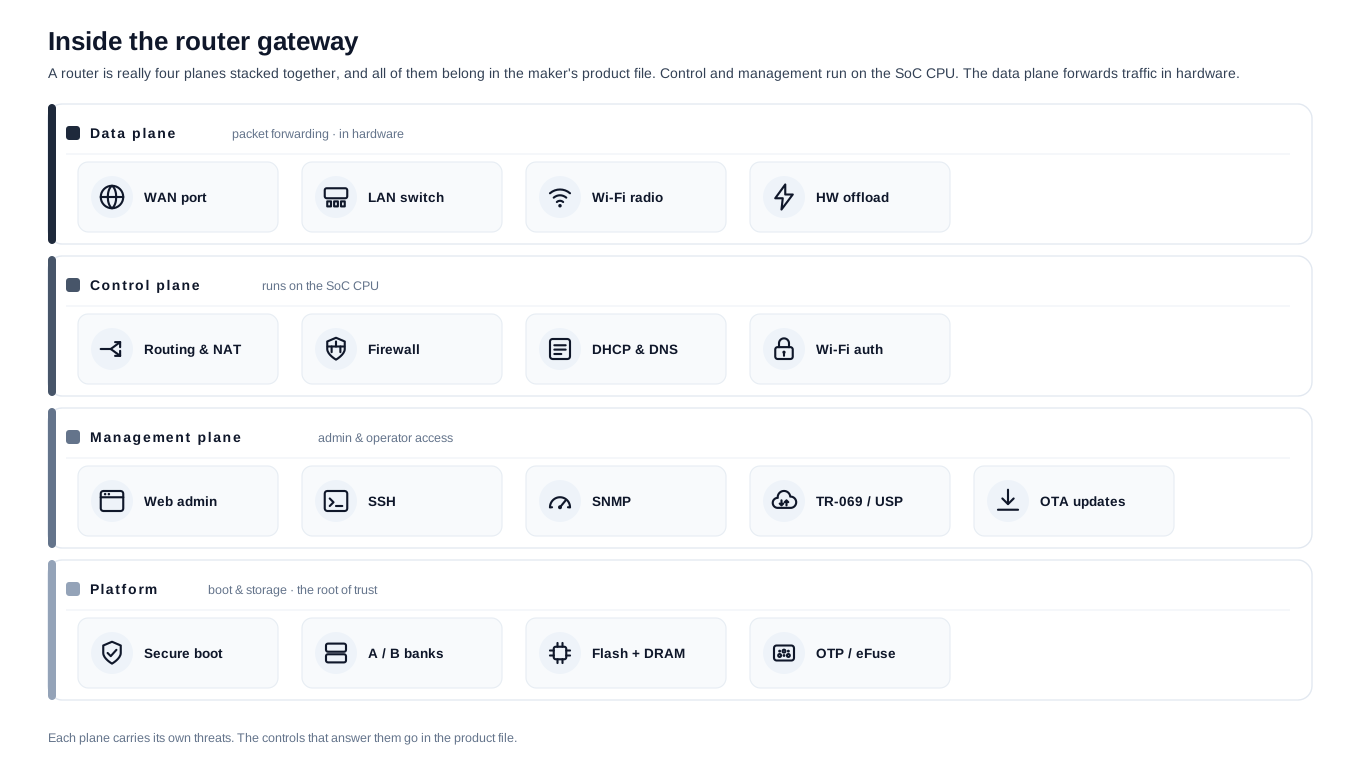
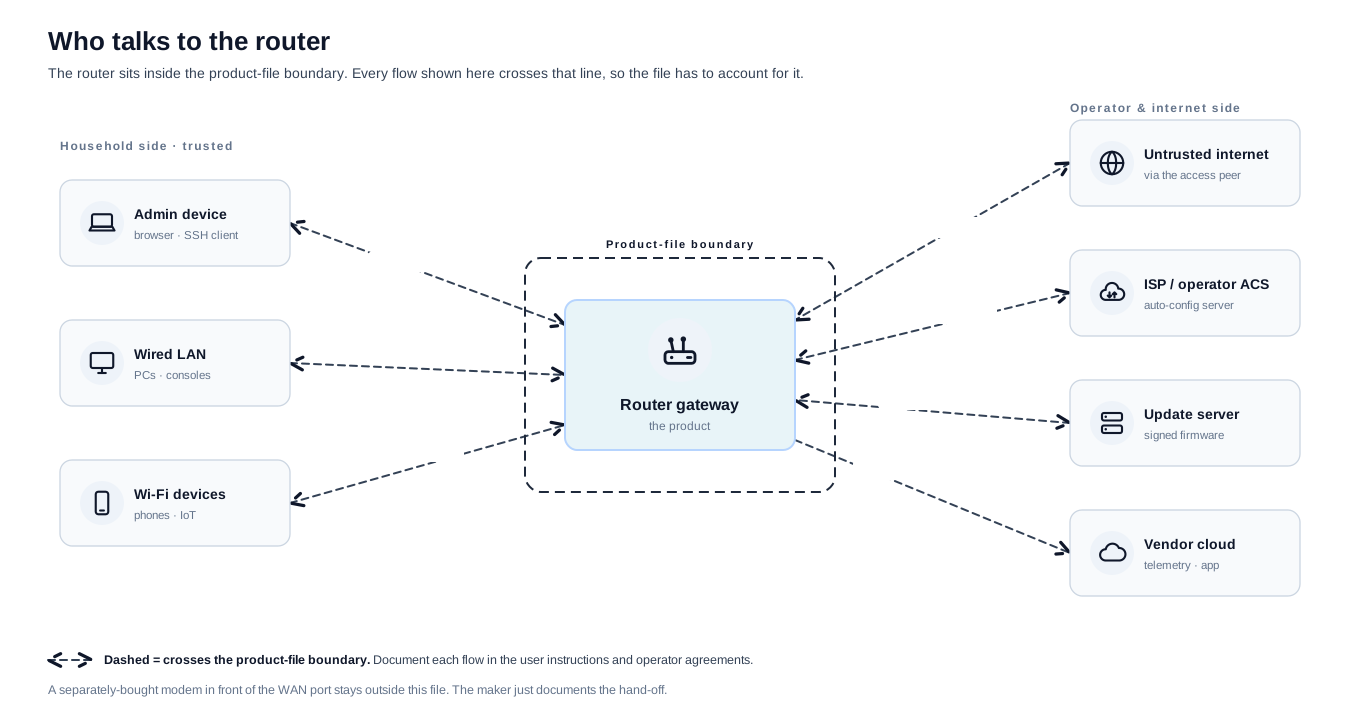
A router, modem or switch product can include more than the plastic box:
- bootloader, operating system, kernel, wireless drivers, WAN stack and LAN services;
- modem, ONT, Ethernet switch silicon, management VLAN behaviour and PoE control where present;
- web admin UI, mobile app pairing and local setup portal;
- TR-069, USP/TR-369 or other remote-management channel;
- vendor or ISP cloud used for remote access, parental controls, telemetry, mesh coordination or update orchestration;
- firmware update service, signing keys, recovery image and support process.
The evidence file should also record what is outside the product: the customer's ISP account, third-party smart-home devices, customer-authored network rules, the user's modem where sold separately, and downstream operator systems not supplied by the manufacturer.
Which conformity route should the manufacturer plan for?
Important Class I does not automatically mean that every router needs third-party assessment, but internal control should not be assumed. If the manufacturer can use the general internal-control route and has fully applied the relevant harmonised standards, common specifications or an appropriate European cybersecurity certification scheme at assurance level at least substantial for the applicable essential requirements, it may be available. If those references do not exist, are only partly applied, are not applied, or do not cover all relevant requirements, plan for EU-type examination plus internal production control or full quality assurance. The general route mechanics and what the EU declaration of conformity must contain live in the conformity-assessment and declaration-of-conformity guides; this page covers only the router-specific choice.
If the same hardware variant is also marketed as a firewall, VPN gateway, network-management appliance or managed security platform, create a separate classification memo for that SKU.
How does the RED cybersecurity deadline map to the CRA?
Most routers and internet-connected modems contain a radio (Wi-Fi, a cellular modem or similar), and that radio-equipped subset has already crossed one cybersecurity gate before the CRA arrives. From 1 August 2025 the Radio Equipment Directive cybersecurity requirements (RED Article 3.3 points d, e and f, set by Delegated Regulation (EU) 2022/30) apply to internet-connected radio equipment such as Wi-Fi routers, mesh nodes, modem-routers and cellular gateways. A purely wired device, such as an Ethernet-only router or a bare DSL, cable or fibre modem with no radio, sits outside RED's cybersecurity scope, but every one of them is still a product with digital elements under the CRA. CRA reporting duties have applied since 11 September 2026, and the CRA becomes fully applicable on 11 December 2027, when the Commission's repeal of the RED cybersecurity Delegated Regulation through Delegated Regulation (EU) 2026/339 takes effect so the two regimes do not overlap.
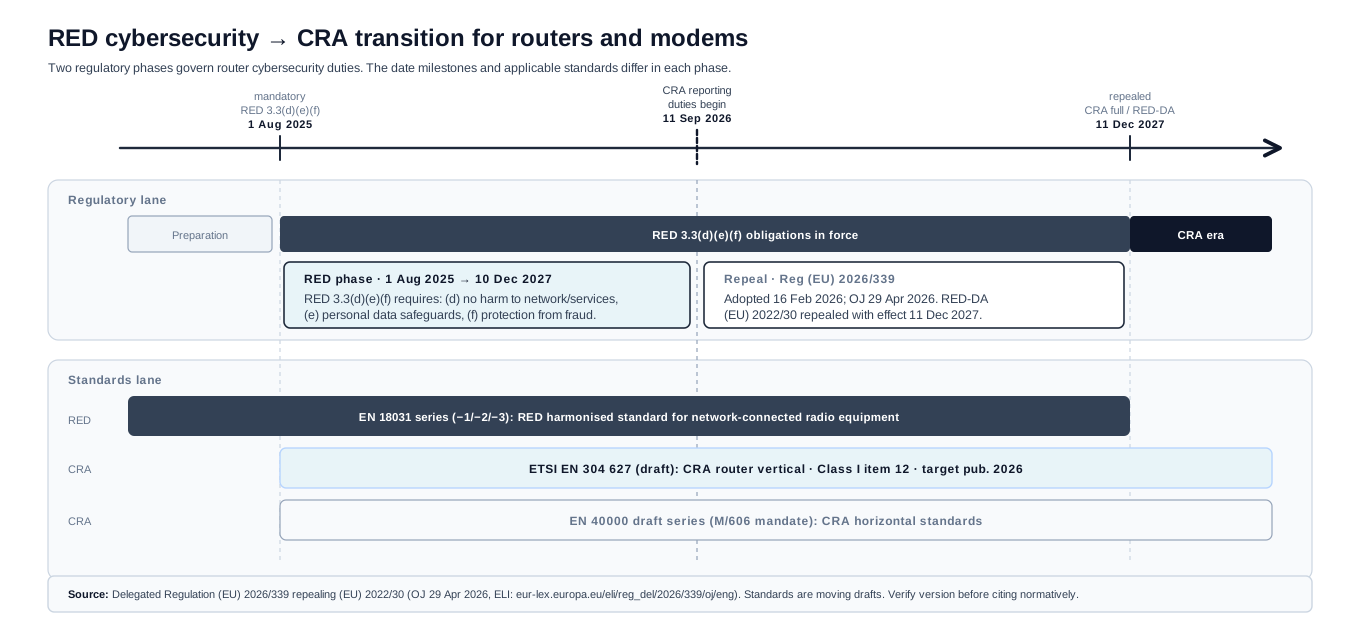
For a router maker the practical reading is:
- Between 1 August 2025 and 10 December 2027, applicable radio equipment meets the RED cybersecurity requirements; the harmonised route runs through the EN 18031 series, with ETSI EN 303 645 as the consumer baseline it builds on.
- From 11 December 2027 the same cybersecurity duties sit under the CRA, with its wider lifecycle obligations: secure-by-default configuration, the vulnerability-handling process, the support-period statement, and the reporting duties that have applied since 11 September 2026.
- A router already placed on the market before 11 December 2027 comes under the CRA only if it is substantially modified after that date. The one exception is the reporting duty, which applies to every in-scope product, including units already sold.
- The router-specific CRA harmonised standard in preparation is ETSI EN 304 627 (Routers, Modems and Switches), which maps to Class I item 12 and the essential cybersecurity requirements. It is still a draft, so plan the conformity route on the standards actually cited at the time, and reuse the controls built for RED (secure defaults, signed updates, access control) as the basis for the CRA file rather than starting a separate project.
What evidence should be ready?
| Evidence area | What to capture for a router or modem-router | Why it matters |
|---|---|---|
| Intended purpose | Home router, ISP CPE, modem, ONT, mesh system, mobile hotspot, switch, VPN router, managed switch | The class follows the actual product variant and claims |
| WAN attack surface | DHCP, PPPoE, IPv6, DNS proxy, NAT, firewall defaults, remote admin posture | The WAN side receives untrusted traffic before the user has configured anything |
| LAN admin | Web UI, local API, setup portal, password policy, account recovery, access controls | Most configuration and ownership mistakes happen here |
| Wireless | WPA2/WPA3 defaults, WPS decision, guest isolation, SSID/password onboarding, Wi-Fi chip firmware | Wireless defaults become household security defaults |
| Remote management | TR-069, USP/TR-369, vendor cloud, ISP cloud, mobile-app remote access | This is often the difference between a box and a fleet-managed product |
| Update path | Signed firmware, rollback protection, ISP-pushed releases, recovery partition, update notice | Router updates must cover the support period and survive OEM/ISP branches |
| Supplier evidence | SoC SDK, Wi-Fi/baseband vendor, bootloader, kernel, TLS stack, DNS/DHCP services | Router vendors inherit a large third-party component surface |
| Role evidence | OEM, ISP, importer, distributor and private-label responsibilities | Branded CPE and firmware forks can change who owns the CRA file |
Which router architecture details should not be missed?
Router evidence has to follow the edge device that is actually shipped. A retail Wi-Fi router, ISP modem-router, PON ONT, cable modem, mobile hotspot, mesh node and managed switch have different WAN exposure, remote-management and firmware-branch risks.
| Architecture checkpoint | Router, modem or switch evidence prompt |
|---|---|
| Boot chain and recovery | Identify boot ROM, bootloader, secure boot state, A/B or single-bank image, recovery trigger, anti-rollback counter and factory reset behaviour. Keep downgrade and recovery abuse tests. |
| WAN and provisioning | Separate Ethernet WAN, PPPoE, DHCP, IPv6, DOCSIS/PON/cellular provisioning and operator profiles. Show which services parse unauthenticated WAN input before the admin UI exists. |
| Wi-Fi and baseband layer | Track Wi-Fi firmware blobs, regulatory-domain configuration, hostapd/wpa_supplicant forks, WPS decision and mesh onboarding. Supplier firmware belongs in the advisory watch. |
| Remote management | For TR-069/CWMP, USP/TR-369, vendor cloud or ISP cloud, record controller identity, certificate trust, connection-request behaviour, command scope and auditability. |
| Switch and mesh control | Managed-switch UI, SNMP/API, VLANs, port mirroring, PoE, EasyMesh or proprietary mesh controllers need their own management-plane exposure checks. For unmanaged or non-configurable switches, first verify whether a digital management or update surface exists. |
| ISP and private-label branches | Keep a branch matrix showing OEM build, ISP fork, operator profile, OTA approval, support-period owner and user-notice path. |
| Manufacturing and return | Record per-device secrets, printed credentials, debug shell policy, UART/JTAG state, RMA wipe and cloud unbind. |
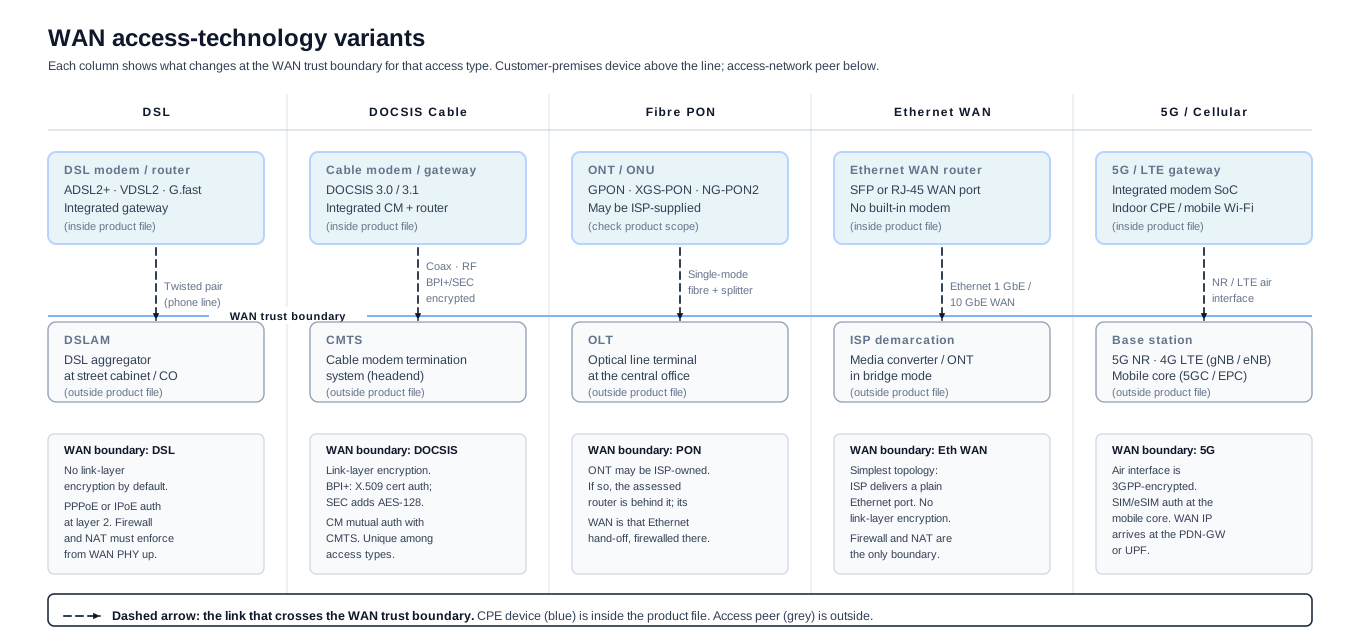
The WAN side is where the device first parses unauthenticated input, and that side changes with the access technology. A retail Ethernet-WAN router, a cable modem-router, a fibre ONT and a cellular hotspot do not share the same provisioning channel or the same upstream peer.
What does a real router risk assessment look like?
Use this as an example of the depth expected in a technical-file risk assessment. The manufacturer still needs to run the assessment against the real router, modem chipset, wireless stack, remote-management channel, supplier SDKs, update ownership, sales claims, and support-period promise.
Example product profile
Example product: ExampleCo HomeRouter R1, a Wi-Fi 7 home router sold in the EU through retail and ISP white-label channels. It has Ethernet WAN, four LAN ports, guest Wi-Fi, a local web admin UI, mobile-app onboarding, optional ISP remote management, signed OTA firmware, automatic update checks, DNS/DHCP services, parental-control profiles, and a recovery image.
The product boundary includes the router hardware, bootloader, kernel, Wi-Fi drivers, WAN services, LAN services, firewall defaults, local web UI, mobile-app pairing, vendor cloud for remote access, optional ISP remote-management agent, OTA service, recovery image, support website, coordinated-disclosure intake and advisory process. It excludes the customer's modem when sold separately, the ISP subscription, third-party smart-home devices, the user's identity provider, and downstream ISP OSS/BSS systems unless the same economic operator supplies them as part of the product.
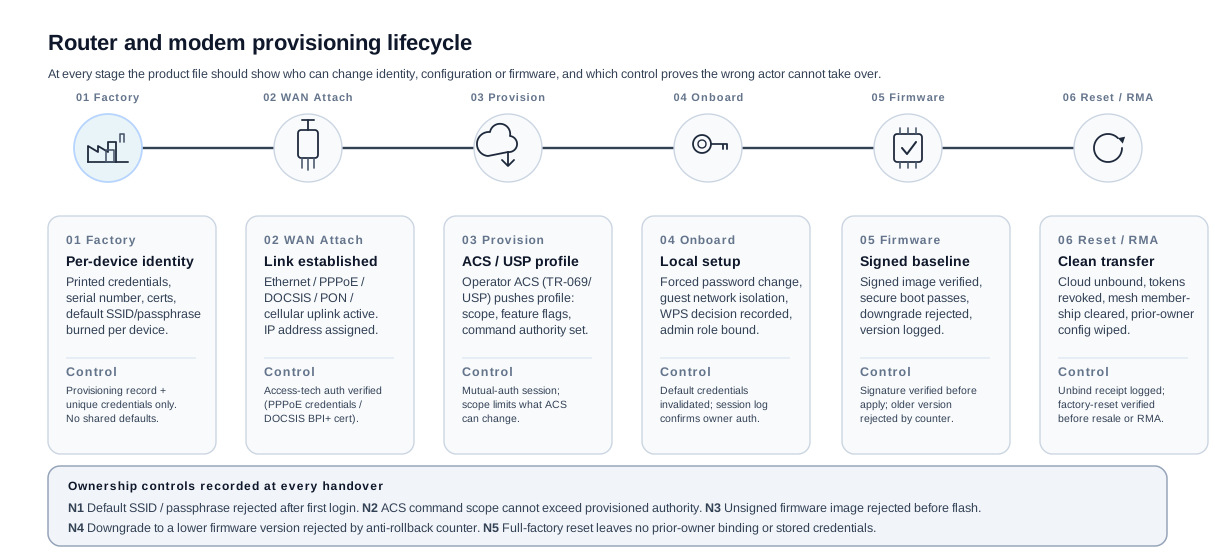
Document assumptions about expected home use, ISP provisioning, admin ownership, and unsupported deployment modes.
Product file | SKU boundary memo | risk file | DoC | CE record | support-period statement
Component inventory | service inventory | wireless-default tests | secure-update tests | remote-management review
Supplier advisories, SDK version record, firmware branch ownership, component CVE triage and patch propagation evidence.
Keep the branch matrix, update release record, ISP approval trail, advisory record, and reporting decision record for actively exploited vulnerabilities or severe security incidents.
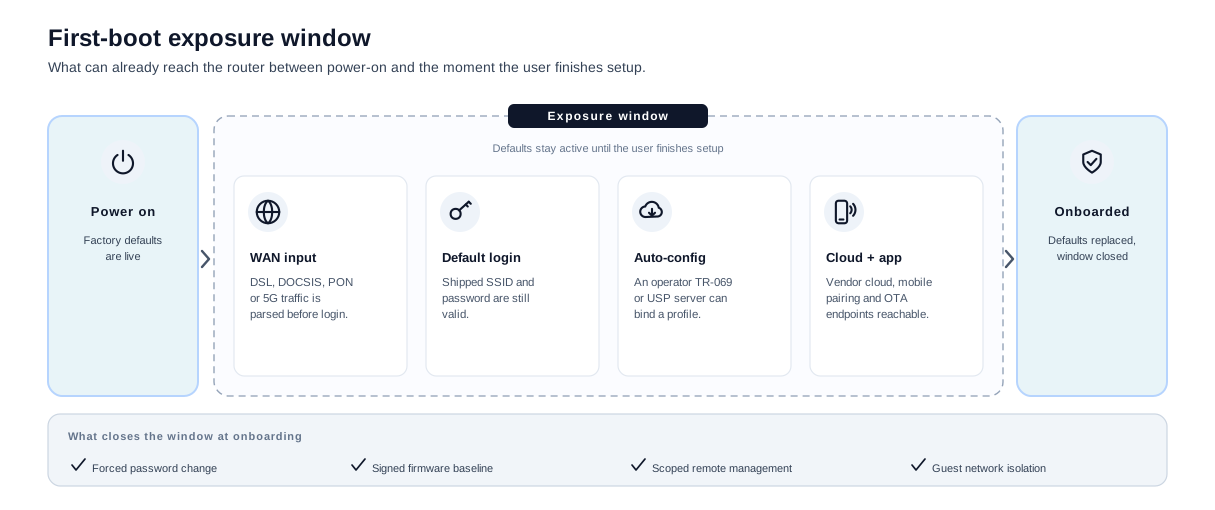
Source branch, SDK version, Wi-Fi firmware, kernel and signing key are the starting baseline.
ACS/USP endpoint, branding, default config, approval workflow and user-notice owner are documented.
Mobile app, cloud pairing, mesh service and support-period statement remain under the vendor release process.
Track whether OEM, ISP and private-label branches received the same security fix or a documented exception.
Asset Inventory
| Asset | Why it matters | Where it lives |
|---|---|---|
| WAN-to-LAN traffic control | Controls household exposure to the internet | NAT, firewall defaults, kernel networking |
| Router admin account and sessions | Grants control over DNS, Wi-Fi, port forwarding, updates and reset | Web UI, mobile app, local token store, cloud account |
| Wi-Fi credentials and guest isolation | Weak defaults expose the home network and connected devices | Wi-Fi configuration, onboarding flow, guest-network rules |
| Remote-management credential | A fleet control credential can affect many routers | TR-069/USP agent, certificate store, ISP ACS/cloud |
| Firmware-signing trust anchor | Protects the router update channel | Bootloader, secure storage, OTA service |
| DNS/DHCP configuration | Can redirect users or break connectivity | Local services, admin UI, ISP provisioning |
| Switch management state | VLANs, port isolation, PoE and management access can expose downstream networks | Managed-switch UI, CLI, SNMP/API, switch ASIC configuration |
| Modem/ONT provisioning state | Registration, bridge/router mode and management credentials affect the internet edge | Modem firmware, operator profile, remote-management agent |
| Support and diagnostic logs | Can reveal SSIDs, serials, IPs, customer account links and crash data | Device logs, mobile app, support portal |
| Firmware branch state | ISP/OEM branch drift can leave vulnerabilities unpatched | OEM Git/release system, ISP fork, OTA repository |
| Secure-boot and anti-rollback state | Protects the recovery path and prevents known-vulnerable images from returning | Bootloader, eFuse/RPMB/TPM state, production records |
| Wi-Fi/baseband firmware | Radio firmware can affect authentication, availability and network exposure | Wi-Fi chip, firmware blob, vendor SDK, production image |
Trust Boundaries
| Environment | Expected exposure | Risk consequence |
|---|---|---|
| WAN interface | Continuously exposed to untrusted network traffic | Parser bugs and exposed services can compromise the device |
| LAN and setup network | Shared with household endpoints and IoT devices | Local attackers can target admin, discovery and weak defaults |
| Wireless interface | Reachable from physical proximity | WPS, weak onboarding or guest isolation failures expose the LAN |
| Switch management plane | Reachable from admin VLAN, LAN or operator tools depending on configuration | Weak defaults can expose VLANs, PoE control or mirror ports |
| Remote-management path | Reaches the device from vendor or ISP infrastructure | Credential leakage or ACS compromise can scale across many routers |
| OTA and recovery path | Receives privileged firmware images | Weak signing or rollback undermines all security fixes |
| ISP/private-label branch | May alter firmware, cloud endpoints and support period | Duties can shift when a brand controls release and support decisions |
Threat Scenarios
| ID | Threat scenario | Asset at risk | Entry point |
|---|---|---|---|
| R1 | WAN admin endpoint is enabled by default or by ISP profile | Admin account, router configuration | WAN |
| R2 | First-use password is shared, predictable, or printed in a way that is reused across batches | Admin account, Wi-Fi credentials | Onboarding |
| R3 | DHCP, IPv6, DNS or PPPoE parser flaw can be triggered before authentication | Router integrity, availability | WAN services |
| R4 | TR-069 or USP credential leaks and permits remote configuration changes | Remote-management credential, DNS, firmware channel | ISP/vendor management |
| R5 | OTA recovery accepts unsigned or older firmware | Firmware integrity | OTA / recovery |
| R6 | Guest Wi-Fi can route to LAN devices or admin UI | Household endpoints, router admin | Wireless / LAN |
| R7 | WPS or QR onboarding can be abused after initial setup | Wi-Fi credential | Wireless onboarding |
| R8 | Debug shell, telnet, SSH or UART remains accessible in production | Router integrity, secrets | Firmware / physical |
| R9 | ISP-branded firmware fork misses an OEM security fix | Firmware branch state | Release process |
| R10 | Mobile app remote-access token remains valid after router transfer or factory reset | Admin account, ownership | Cloud / app |
| R11 | DNS or parental-control cloud failure creates unsafe fallback behaviour | DNS integrity, availability | Cloud dependency |
| R12 | Supplier vulnerability in SoC SDK, Wi-Fi firmware or bundled network daemon is not triaged during support | Router integrity, availability | Supplier component |
| R13 | Managed-switch UI or SNMP/API is exposed on the user LAN with weak default credentials | Switch management state, VLAN integrity | LAN / management plane |
| R14 | Modem or ONT provisioning profile enables remote admin or bridge-mode behaviour outside the assessed release state | Modem/ONT provisioning state, WAN exposure | Operator provisioning |
| R15 | Recovery mode, reset-hold boot or TFTP recovery accepts an unauthenticated or downgraded image | Firmware integrity, secure-boot state | Bootloader / recovery |
| R16 | Wi-Fi firmware, mesh onboarding or WPS behaviour differs between hardware revisions without release evidence | Wi-Fi credentials, guest isolation | Wireless / supplier SDK |
| R17 | USP/TR-369 or TR-069 command scope allows more than the operator profile intended | Remote-management credential, DNS, OTA | ISP/vendor management |
| R18 | App binding or cloud ownership token survives factory reset or ISP return | Admin account, ownership | Reset / cloud account |
Initial Risk Register
| ID | Likelihood | Impact | Initial decision | Rationale |
|---|---|---|---|---|
| R1 | Low | High | Treat before release | Remote admin exposure gives direct control and is easy to scan |
| R2 | Medium | High | Treat before release | Household users often keep default settings unless onboarding forces change |
| R3 | Medium | High | Treat before release | WAN parsers are exposed before authentication |
| R4 | Medium | Severe | Treat before release | Remote-management failures can scale across an ISP fleet |
| R5 | Low | Severe | Treat before release | Firmware rollback can keep known vulnerable builds alive |
| R6 | Medium | Medium | Treat before release | Guest isolation is a core user expectation |
| R7 | Medium | Medium | Treat before release | Physical proximity attacks are realistic in apartments and shared spaces |
| R8 | Medium | High | Treat before release | Debug access is a recurring production escape path |
| R9 | Medium | High | Treat before release | Branch drift is foreseeable when OEM and ISP releases split |
| R10 | Medium | High | Treat before release | Router resale and ISP return flows are foreseeable |
| R11 | Low | Medium | Treat before release | Cloud-dependent controls need safe fallback behaviour |
| R12 | Medium | High | Treat before release | Router component stacks receive vulnerabilities throughout support |
| R13 | Medium | High | Treat before release | Managed-switch configuration can affect many downstream devices |
| R14 | Low | High | Treat before release | Provisioning drift can expose the internet edge at fleet scale |
| R15 | Medium | Severe | Treat before release | Recovery is a privileged path that attackers and service teams can reach |
| R16 | Medium | High | Treat before release | Radio and mesh behaviour often changes with supplier SDKs and hardware revisions |
| R17 | Medium | Severe | Treat before release | Remote-management scope errors can affect fleets |
| R18 | Medium | High | Treat before release | Router returns, resale and ISP swaps are normal lifecycle events |
Control and Evidence Mapping
| Threats | Design control | Evidence the manufacturer should keep |
|---|---|---|
| R1, R8 | WAN admin disabled by default, production service inventory, firewall rules for management, no telnet or factory shell | Exposure scans, production image checklist, service-list diff |
| R2, R7 | Unique setup secret or forced credential creation, short pairing window, WPS disabled or justified, rate limits | Onboarding test, credential-generation evidence, wireless setup review |
| R3 | Parser hardening, fuzzing, service privilege separation, default-drop WAN posture | Fuzzing reports, service isolation design, crash triage |
| R4 | Mutual authentication, certificate rotation, least-privilege provisioning, ACS/USP profile review | Remote-management security review, certificate lifecycle record |
| R5 | Secure boot, signed firmware, monotonic version counter, recovery image signature checks | OTA test report, downgrade rejection, recovery test |
| R6 | Guest network isolation, admin UI not reachable from guest, regression tests across mesh nodes | Network isolation test, mesh roaming test |
| R9 | OEM/ISP branch matrix, patch merge policy, release approval, end-of-support alignment | Branch matrix, patch propagation record, ISP approval trail |
| R10 | Ownership transfer workflow, cloud unbind on reset, token revocation, returned-device wipe | Reset test, ownership-transfer test, RMA checklist |
| R11 | Local DNS fallback behaviour, safe parental-control failure mode, clear user notice | Failure-mode test, user-notification evidence |
| R12 | SBOM monitoring, supplier advisory intake, firmware component owner, release note traceability | SBOM diff, advisory log, component decision record |
| R13 | Management-plane binding, unique admin setup, SNMP/API disabled or hardened by default, VLAN isolation tests | Exposure scan, default-configuration test, switch-management review |
| R14 | Assessed provisioning profile, remote-admin restrictions, operator change-control, rollback and audit trail | Provisioning profile record, fleet-configuration audit, operator approval trail |
| R15 | Authenticated recovery, signed recovery image, anti-rollback state, physical recovery warning where relevant | Recovery abuse test, boot-chain record, downgrade rejection |
| R16 | Hardware-revision matrix, Wi-Fi firmware inventory, WPS/mesh regression tests, regulatory-domain review | Revision matrix, radio firmware record, wireless setup tests |
| R17 | Least-privilege remote-management profile, controller certificate inventory, command audit and approval | TR-069/USP profile review, certificate lifecycle record, audit sample |
| R18 | Ownership transfer workflow, cloud unbind on reset, ISP return wipe, token revocation | Reset test, returned-device checklist, cloud-unbind evidence |
Residual Risk After Controls
| Residual area | Why it remains | Operating evidence |
|---|---|---|
| ISP branch drift | OEM and ISP release approval can move at different speeds | Branch matrix, escalation path, release-delta review |
| Household endpoint compromise | Malware on a LAN client can still attack local admin or DNS settings | Local-auth controls, token revocation, admin alerts |
| New WAN vulnerabilities | WAN-facing code keeps receiving hostile traffic during the support period | Exploit monitoring, fuzzing cadence, emergency update process |
| Supplier firmware lag | Wi-Fi and SoC vendors may release fixes on their own timelines | Supplier SLA record, mitigation notes, customer advisory process |
How Should Support, Updates and Reporting Work?
For the HomeRouter R1 example, the practical CRA file should include the support-period operating model, not only the pre-market release evidence.
| Operating area | Evidence to prepare |
|---|---|
| Support period | A support-period rationale for the retail SKU and the ISP-branded SKU, with the month/year end date visible at purchase and in the router UI where technically feasible. Unless expected use is shorter, plan for at least five years. |
| Security update availability | Security firmware fixes and security update packages remain retrievable for at least 10 years after issue, or for the remainder of the support period if longer. Recovery images, hashes, release notes and rollback decisions should be retained as evidence, but not every non-security package should be described as a legal 10-year availability claim. |
| OEM and ISP branch matrix | Which firmware branch is assessed, who signs it, who approves release, who owns emergency fixes, and how upstream security fixes reach private-label builds. |
| Single vulnerability contact | A direct vulnerability-reporting contact for the manufacturer of record, not only subscriber support or an automated-only chatbot. If an ISP is manufacturer for a branded SKU, the ISP owns an intake route for product-security reports. |
| Component due diligence | SBOM monitoring for kernel, wireless firmware, DNS/DHCP services, TLS stack, mobile SDKs and remote-management agent, with supplier advisory triage, upstream notification and fix-sharing where appropriate. |
| Active exploitation workflow | Reporting through the single reporting platform to the CSIRT designated as coordinator and to ENISA: early warning within 24 hours, follow-up notification within 72 hours, final vulnerability report within 14 days after a corrective or mitigating measure is available, and impacted-user notice or mitigation instructions where appropriate. |
| Severe product-security incident workflow | Reporting through the same platform and addressees: early warning within 24 hours, follow-up notification within 72 hours, final incident report within one month after the incident notification, and customer/ISP coordination including user notice where appropriate. |
| Technical-file table of contents | Product identity, boundary diagram, WAN/LAN/wireless assets, threat model, risk register, controls, test evidence, SBOM, update process, vulnerability process, support-period rationale, instructions, declaration and conformity route record. |
Which validation gates run before release?
A router release should not pass on a blanket "security reviewed" note. List the specific decisions that can hold the shipment, and give each one the failure it guards against, the control that closes it and the artifact that proves the control actually runs.
- G1First-use credentialsBlock release
- Failure
A shared or predictable admin or Wi-Fi password, or a printed secret reused across a batch.
- Control
Unique per-device secret or forced credential creation; WPS off or justified.
- Proof
Onboarding test and credential-generation evidence.
- Failure
- G2WAN exposure after provisioningBlock release
- Failure
Remote admin, or an unnecessary or unassessed service that parses unauthenticated WAN input, is reachable before the user has configured anything.
- Control
WAN admin off by default, default-drop posture, parser hardening and a minimal service list.
- Proof
Post-provisioning WAN exposure scan.
- Failure
- G3Wireless and guest isolationBlock release
- Failure
The guest network can route to LAN devices or reach the admin UI.
- Control
Guest isolation by default; admin UI unreachable from guest; regression across mesh nodes.
- Proof
Network-isolation and mesh-roaming test.
- Failure
- G4Update and recovery pathBlock release
- Failure
OTA or recovery accepts an unsigned or older firmware image.
- Control
Secure boot, signed images, a monotonic version counter and downgrade rejection.
- Proof
Failed-downgrade and recovery-abuse test result.
- Failure
- G5Remote-management scopeBlock unless documented
- Failure
The TR-069 or USP command scope lets the controller change more than the assessed operator profile.
- Control
Least-privilege profile, controller-certificate inventory, command audit.
- Proof
Profile review and command-audit sample.
- Failure
- G6Supplier stackShip with monitoring
- Failure
A vulnerability lands in the SoC SDK, Wi-Fi firmware or a bundled network daemon during the support window.
- Control
Component inventory with a named owner, advisory watch and backport readiness.
- Proof
Affected-component triage decision.
- Failure
Who owns router development from concept to support?
Ownership of a router release changes hands as it goes from a product definition to a fleet running in customers' homes and on ISP networks. The rail below gives each stage a single accountable lead, the record that lead keeps current, and the gate that has to close before the next stage starts.
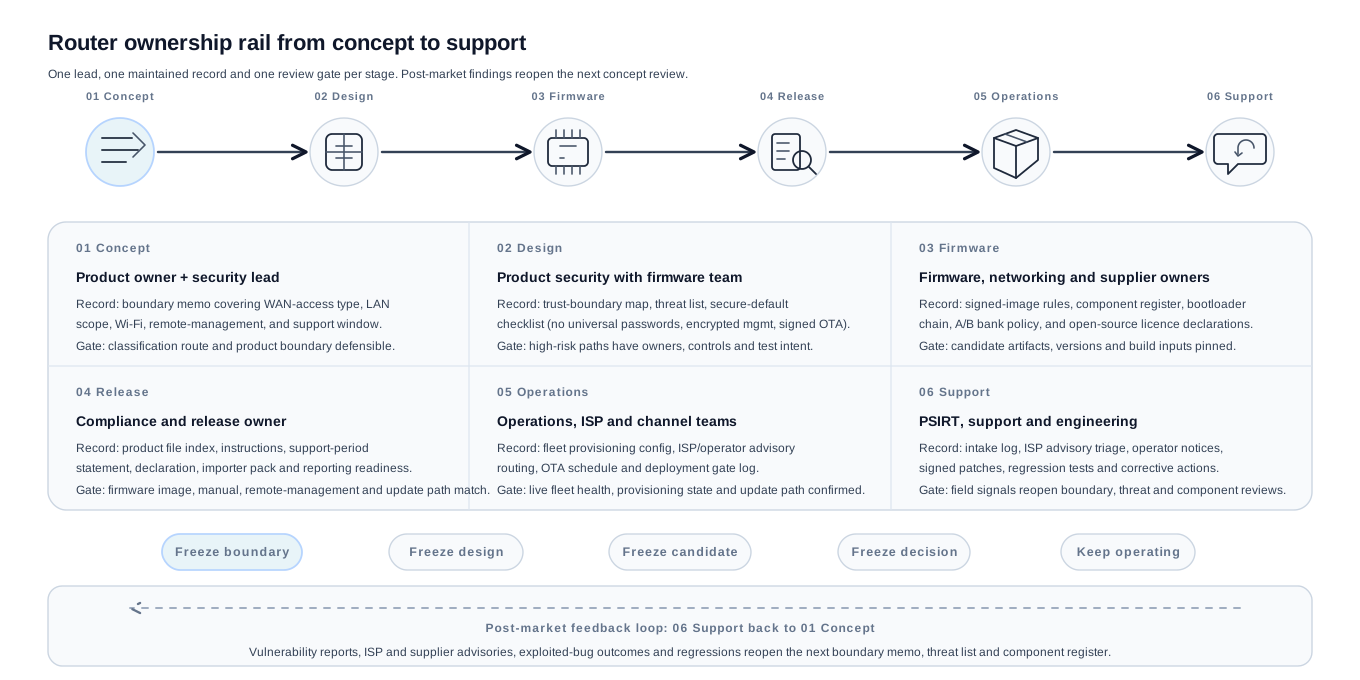
Each transition is a freeze point: the boundary is fixed before architecture starts, the design intent before code, the build before verification, and the release before it ships, after which the firmware is kept running through the support window. A vulnerability report, an ISP or supplier advisory, or a field failure reopens the next boundary memo, threat list and component inventory rather than the one that already shipped.
Which evidence records belong in the file?
The file should let a reviewer follow the router decision from product identity to security controls. Each row points to a maintained record, not a folder of disconnected screenshots.
| Evidence area | What to capture for a router, modem-router or switch |
|---|---|
| Product identity | Model, hardware revisions, SoC and Wi-Fi chipset, WAN type, firmware branch, mobile-app version, switch/mesh options |
| Intended purpose | Home router, ISP CPE, internet modem, ONT, mesh kit, mobile hotspot, managed switch or VPN router, with the retail and ISP-branded variants named |
| Cyber-resilience design file | WAN exposure, LAN and wireless defaults, remote-management authority, OTA and recovery path, threat list and treatment plan |
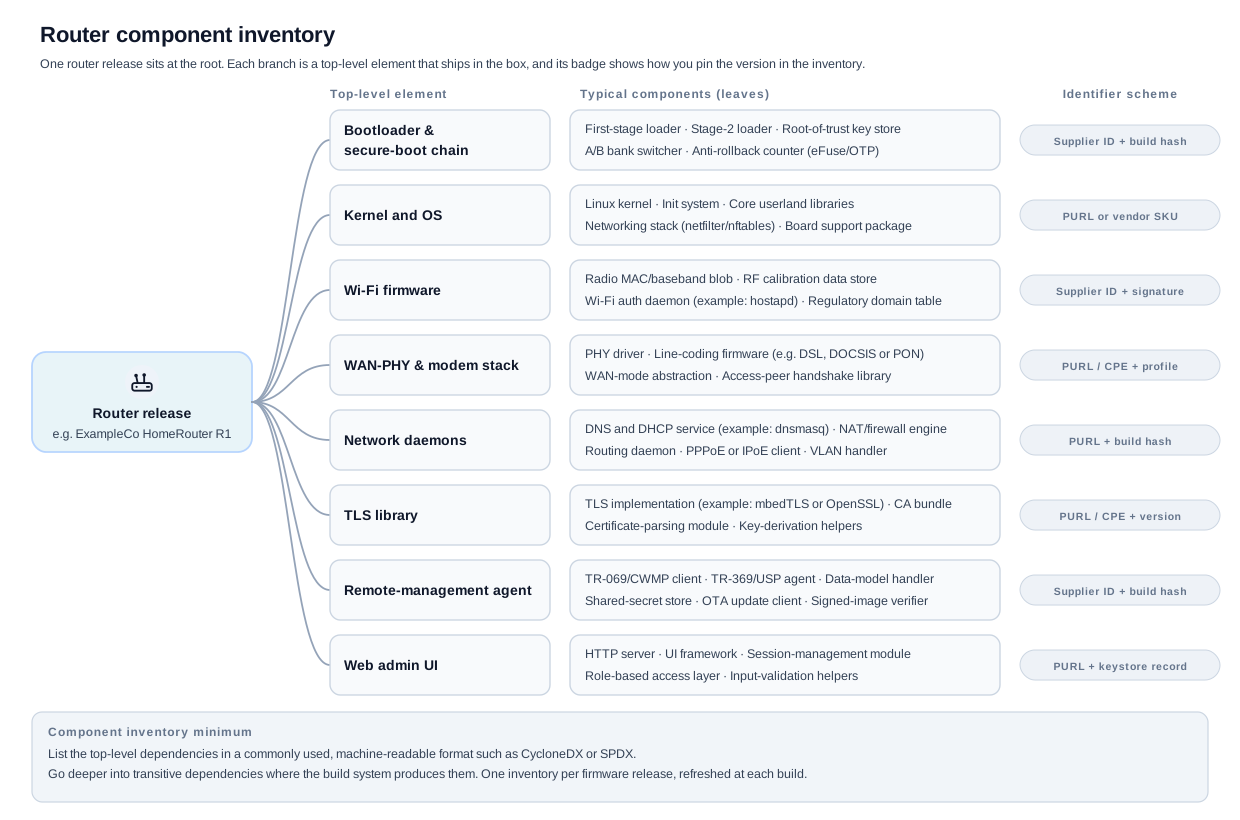
| Component inventory | Bootloader, kernel, Wi-Fi firmware, WAN-PHY/modem stack, DNS/DHCP service, TLS stack, remote-management agent, mobile SDKs, with named owners and advisory watch |
| Secure defaults | No shared default credential, WAN admin off by default, signed updates, downgrade rejection, guest isolation, locked debug ports, post-provisioning service inventory |
| Update mechanism | Signed firmware, recovery image, anti-rollback state, ISP/OEM branch map, user update notice |
| Vulnerability handling | Disclosure policy, single point of contact, triage workflow, component advisory watch, ISP/private-label advisory routing |
| User instructions | Secure onboarding, password and guest setup, update settings, end-of-support disclosure, decommissioning and reset |
| Traceability and contact | Type/batch/serial information, maker or ISP contact, support-period end date, and a single vulnerability-reporting contact that is not only an automated bot |
What goes in a router SBOM?
The CRA requires a machine-readable SBOM that identifies the product's components and covers at least top-level dependencies, without naming one fixed format yet. Router makers normally choose CycloneDX or SPDX. The cross-product detail on SBOM mechanics lives in the dedicated SBOM guide; this section covers the router-specific tree.
A router release ships several digital elements with separate update cycles, not one binary. Two patterns meet the CRA minimum: one product-level component inventory with element-separated sections (bootloader, kernel, Wi-Fi firmware, WAN-PHY stack, network daemons, TLS, remote-management agent and web UI each version-pinned), or one inventory per shipped element refreshed at each release. Either is acceptable so long as it is machine-readable and top-level dependencies are covered.
What does the release sign-off check?
Sign-off before the EU release should be able to close four record folders, shown as Q1 to Q4 below. The complete file index sits in the evidence map above; the four questions here are only the ones that block the release when a folder is empty.
| Folder | Release question | Router-specific evidence pointer |
|---|---|---|
| Q1 Classification rationale memo | Why is this product classified the way it is? | Core function (routing and internet connectivity), intended use, sales claims, retail vs ISP variant and the conformity route chosen |
| Q2 Shipped-elements inventory | What exactly is the product? | Router hardware, firmware, WAN/LAN/wireless services, web UI, remote-management agent, OTA service, cloud endpoints and the excluded customer/ISP systems |
| Q3 Secure-default test pack | What has been secured by default and how will it be updated safely? | No shared default credential, WAN admin off by default, signed updates, downgrade rejection, guest isolation, WPS decision, locked debug ports, post-provisioning service inventory |
| Q4 Vulnerability-handling process | How will vulnerabilities and severe incidents be handled after shipping? | Public contact, disclosure policy, triage workflow, component advisory watch, ISP/private-label advisory routing, 24-hour and 72-hour notification readiness |
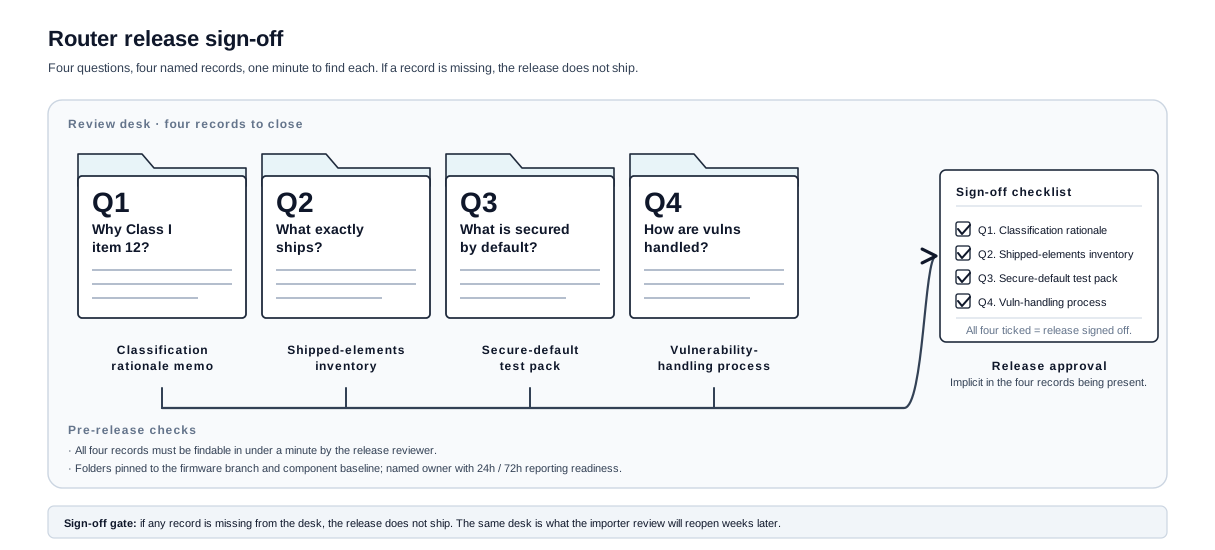
Release sign-off folders Q1 to Q4
- Q1 Classification rationale memo. Why Class I item 12? Core function, intended use, sales claims, retail vs ISP variant and the conformity route chosen.
- Q2 Shipped-elements inventory. Router hardware, firmware, WAN/LAN/wireless services, web UI, remote-management agent, OTA service, cloud endpoints and excluded customer/ISP systems.
- Q3 Secure-default test pack. No shared default credential, WAN admin off by default, signed updates, downgrade rejection, guest isolation, WPS decision, locked debug ports.
- Q4 Vulnerability-handling process. Public contact, disclosure policy, triage workflow, component advisory watch and reporting readiness for warnings, notifications and final reports.
Sign-off gate: if a record is missing, the release is not signed off.
How does the router hand off to importer, distributor, ISP and operator?
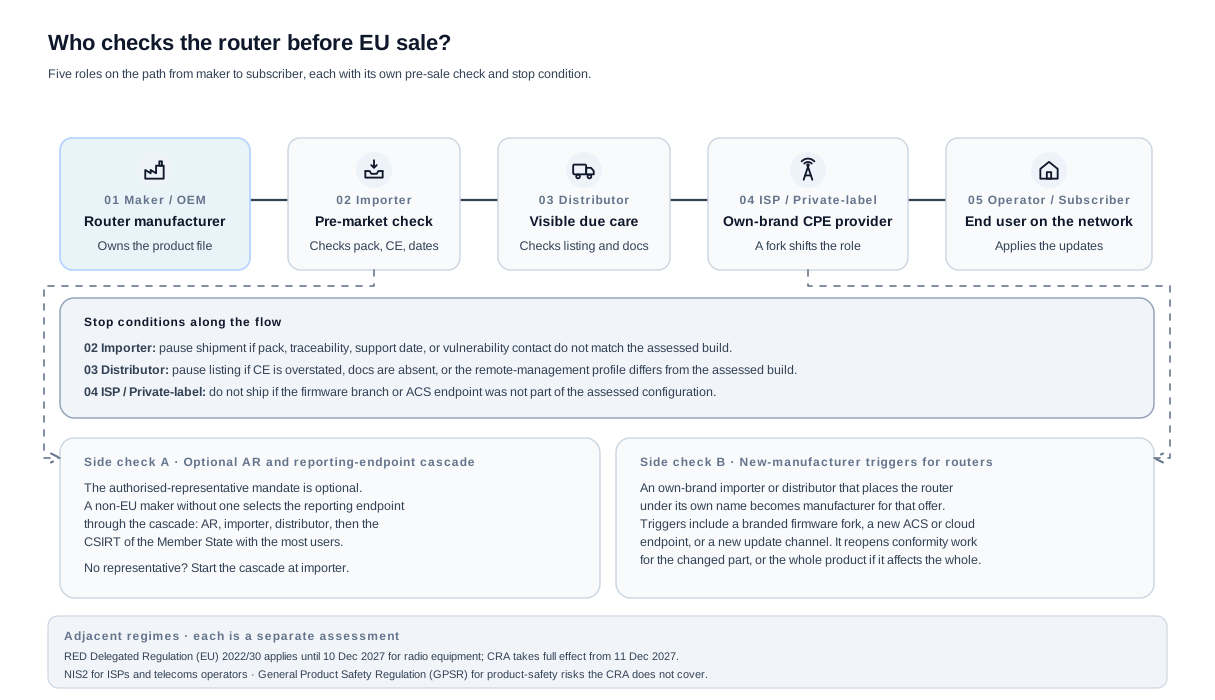
Economic-operator handoff: roles and side checks
- 01 Maker / OEM. Owns the release pack: declaration, CE, file index, support window and vulnerability contact.
- 02 Importer. Verifies the pack, CE, file index, support date and vulnerability contact, and confirms the received build is the assessed build: wireless country settings, ISP profiles, remote-management certificates, app pairing and OTA endpoints. Pause shipment if any of these is doubtful.
- 03 Distributor. Checks visible CE, supplied docs, support and update statements, and does not add claims such as "security gateway", "business firewall" or "managed VPN appliance" that sit outside the assessed boundary. Pause listing if it overstates support, mismatches the declaration or keeps selling after a known issue.
- 04 ISP or private-label brand. Branding, cloud management, update ownership and remote-management operation can trigger manufacturer obligations on their own. Placing the router under its own name, or substantially modifying it (branded firmware, a new cloud, a new update channel), makes it the manufacturer for that offer, so the supplier file is not a substitute for its own role analysis.
- 05 Operator or subscriber. Receives advisories and updates and reports issues back. Not a manufacturer.
Side check A. The authorised-representative mandate is optional, but where it exists it must be written and cover keeping the declaration and documentation available and cooperating with authorities. A non-EU maker without one uses the cascade: importer, distributor, then highest user base. With no Union-based operator in the reporting chain, the reporting endpoint falls to the Member State where the most users are located.
Side check B. An own-brand importer or distributor, or any substantial modifier, becomes the manufacturer for the affected offer.
Frequently Asked Questions
Is a router Class II because it has a firewall?
Not by default. A normal router is usually Important Class I. It becomes a Class II question when firewalling, intrusion detection or intrusion prevention is the product's core function.
Is an ISP-supplied router covered?
Yes, if it is placed on the EU market as a product with digital elements. The key practical issue is who is the manufacturer for the branded firmware, support period, update channel and vulnerability process.
Is a router Critical?
No. Consumer routers, ISP modem-routers and switches are not Critical merely because they are important to network access.
Does commercial open-source router firmware change the answer?
It can. A commercially supplied firmware image or appliance distribution may itself be a product with digital elements. The manufacturer should document what is placed on the market and who owns updates and vulnerability handling.
If the software genuinely qualifies as free and open-source software and falls in an Important category, the CRA has a specific conformity option where the required technical documentation is public at placement on the market. Do not apply that route to a private ISP firmware fork or a commercial appliance merely because it includes open-source packages.
Does meeting the RED cybersecurity deadline mean a router is already CRA-compliant?
No. From 1 August 2025 internet-connected radio equipment meets the Radio Equipment Directive cybersecurity requirements, and those controls (secure defaults, update integrity, access protection) are the right foundation. But the CRA adds a wider lifecycle: a documented vulnerability-handling process, a published support-period end date, secure-by-default across the whole product, and reporting duties. The RED cybersecurity Delegated Regulation is repealed from 11 December 2027, when the CRA takes over.
Recheck trigger: treat the RED file as the starting point and gap-assess it against the CRA essential requirements before 11 December 2027.
Which harmonised standard applies to a router under the CRA?
For the radio-equipment phase the harmonised set is the EN 18031 series, building on ETSI EN 303 645 as the consumer baseline. The router-specific CRA standard in preparation is ETSI EN 304 627 (Routers, Modems and Switches), which maps to Class I item 12. It is still a draft, so confirm the cited standards and any harmonisation restrictions at the time of assessment.
Conformity record: a short memo naming the standards relied on, the version, any restriction that does not fit the product, and the resulting conformity route.
Is a managed switch treated like a router, and is an unmanaged switch in scope?
A managed switch has a management plane (web UI, CLI, SNMP/API, VLANs) and a firmware update path, so it is normally treated as Important Class I network equipment with its own management-plane evidence. A purely unmanaged, non-configurable switch with no management surface, no firmware update and no connected function needs a case-specific check on whether it is a product with digital elements at all.
Boundary record: a one-line note per switch SKU stating whether a management or update surface exists.
Are mesh Wi-Fi kits one product or several?
The mesh nodes that form a system are normally the router product or product family. Assess the kit as shipped: the controller node, satellite nodes, the onboarding flow and the mesh control protocol. Inter-node trust and the onboarding handshake are part of the wireless attack surface.
Boundary record: name the nodes in the kit, the mesh control protocol and the onboarding method in the boundary memo.
Is a standalone modem or ONT covered if it only bridges?
A modem, cable modem or fibre ONT intended for the internet connection is normally Important Class I, even in bridge mode, because the internet-modem function is the core product function and the device still has firmware, a provisioning channel and often a remote-management agent. Bridge versus router mode changes the exposure, not the basic classification.
Boundary record: record the provisioning channel, the remote-management agent and whether bridge or router mode is the assessed default.
Is a 4G or 5G mobile hotspot in scope?
Yes. Cellular WAN is still internet connectivity, so a mobile hotspot or 4G/5G router is normally Important Class I. The cellular provisioning path and SIM/eSIM handling are part of the WAN attack surface.
Boundary record: name the cellular module, the provisioning path and the management channel.
How long must a router be supported and updated?
The support period is at least five years unless the expected use time is shorter; many routers and ISP CPE run much longer, so the file should state a window the maker can actually deliver and show the end date before purchase. Security updates should remain retrievable for at least ten years after issue, or for the remainder of the support period if longer. The general rules live in the support-period and end-of-support disclosure guides.
Support record: a support-period rationale for the retail SKU and the ISP-branded SKU, with the end date visible at purchase and in the router UI where feasible.
What counts as a secure update for a router?
A signed firmware image, verified through a secure-boot chain, with a monotonic version counter so an older vulnerable build cannot be reinstalled, and a recovery path that also rejects unsigned or downgraded images. ISP-pushed and OEM updates must both follow this path.
Test artifact: a signed-update verification log, a failed-downgrade test and a recovery-abuse test for the exact firmware build.
Does TR-069 or USP remote management change the product boundary?
If the maker or ISP supplies the remote-management channel, it is inside the boundary and is a fleet-control path, not just an operator feature. The operator's auto-configuration server, the connection-request mechanism, the command scope and the certificate trust all belong in the assessment.
Evidence: a controller-certificate inventory and a command-scope matrix bound to the assessed operator profile.
Who is the manufacturer for ISP-branded CPE?
Whoever places the product on the market under their own name or trademark, or substantially modifies the assessed product. An ISP that re-brands OEM hardware, forks the firmware, runs the management cloud or owns the update channel can take on manufacturer obligations for that branded SKU, including the vulnerability-reporting contact.
Role record: a written split of who owns the declaration, the firmware branch, the update channel, the support period and the reporting contact.
What is the first evidence item a router maker should create?
A short classification-and-boundary memo for the exact SKU: router, modem-router, mesh kit, switch, hotspot or VPN router. Name the WAN type, the wireless stack, the LAN admin surface, the remote-management channel, the cloud services, the update ownership, the support period and the excluded systems.
Classification record: a one-page memo the risk assessment, conformity-route choice, importer pack and support-period statement can all reference.
What if a vulnerability is found in router firmware after release?
Take corrective measures immediately and be ready for the reporting sequence: a 24-hour early warning for an actively exploited vulnerability, a 72-hour notification, a final report once a corrective or mitigating measure is available, and user notification. For a router the corrective measure is usually a signed firmware update pushed across the OEM, ISP and private-label branches, with a documented exception where a branch cannot take the same fix. The general reporting mechanics live in the vulnerability-handling and coordinated-vulnerability-disclosure guides.
Corrective-action record: affected models and firmware branches, the signed update artifact, the branch propagation trail, the user advisory text and the notification reference.
When should the router risk assessment be updated?
Any time a shipped router changes in a way that moves a trust boundary: a new WAN type, a new remote-management profile, a Wi-Fi or SoC SDK change, a new cloud dependency, a mesh-onboarding change, a debug-port behaviour change or a new ISP branch. A release note is not enough if the change reopens an exposure or authority path. Reporting duties have applied since 11 September 2026, so the disclosure policy and single contact must already be working.
Recheck trigger: any change to WAN exposure, wireless defaults, remote-management scope, update path, supplier components or ISP branch reopens the boundary memo and the risk assessment.