Are Security Cameras Important Products under the CRA?
Summary
A connected smart-home camera sold for physical security should be planned as an Important Class I product. The class can change when the same camera hardware is sold for another purpose: video calls, professional CCTV, recording infrastructure, access control, or another security product.
The first record to create is a classification-and-boundary memo for the exact camera variant. It should name the intended security function, sales context, supplied digital elements, support period, and route rationale.
The support-period record should start from the camera's expected use, reasonable user expectations, product nature, intended purpose and relevant component support. The CRA floor is at least five years unless the product is expected to be used for less than five years, and the end date, at least month and year, must be clearly specified at purchase.
How do you classify a camera release?
Start with the offer, not the camera shell. The route depends on the sales claim, the function the buyer relies on, and the digital elements supplied with that release.
Sold for video calls, meetings or general communication.
Communication peripheral; not household security monitoring.
Device firmware, driver or meeting-app integration. No supplied monitoring cloud or alarm workflow.
Sold for home surveillance, baby monitoring, doorbell security or alarm integration.
Household security or monitoring is the function the buyer relies on.
Firmware, local storage, app, maker cloud, update service and vulnerability handling when supplied for that function.
Sold as professional surveillance, recording infrastructure or part of another security product.
The recorder, VMS, firewall, VPN, access-control, biometric or identity function may be the real product.
Camera plus recorder, management server, installer cloud, access-control service or security appliance.
Use the diagram as a routing aid, not as the final classification record. The written record still needs the exact claim, intended use and shipped boundary. For a smart-home camera, the key phrase is smart home products with security functionalities. A camera sold for home surveillance, intrusion monitoring, baby monitoring or alarm integration sits in that category. A general-purpose webcam usually does not.
Then test whether another listed function is doing the controlling work. Important classification follows the product's core functionality, not the parts that happen to ride along inside it: embedding a security-relevant component does not pull the rest of the offer into the Important route. If the camera is really being sold as a firewall, VPN gateway, access-control reader, biometric authentication device, identity-management system or privileged-access management product that happens to include a lens, classify that core function first.
For professional surveillance, do not force the smart-home category. A professional CCTV camera, VMS or NVR can still be a product with digital elements under the CRA and still needs security requirements, support-period planning, vulnerability handling and technical documentation. The class depends on intended use, shipped boundary and core function.
The classification memo should answer four questions:
- Is the camera sold for household security, baby monitoring, doorbell security or alarm integration?
- Is the camera the product's core function, or is a firewall, VPN, access-control, biometric or identity function doing the real work?
- Which digital elements are supplied for the intended function: firmware, local storage, app, manufacturer cloud, update service and vulnerability handling?
- Which systems are outside the manufacturer's offer: customer router, third-party recorder, installer network, external identity provider or monitoring centre?
Product boundary and shipped elements
For a camera maker, the compliance boundary is rarely just the plastic housing. It should follow the product placed on the market and the digital elements needed for the intended security function.
Inside the camera maker's boundary by default: device firmware and every running service on it, the network interface stack, on-device storage, the companion app the buyer is told to install, any maker-hosted cloud that supplies the product's documented features, the OTA update infrastructure and the vulnerability-handling process behind it.
Outside that boundary unless the maker actually sells the layer: the buyer's home router, a third-party VMS or NVR the customer chose, an installer's site network, an external identity provider used for SSO, and a professional monitoring centre under a separate contract.
None when these products come from other manufacturers. If the camera maker also sells the recorder, VMS, identity service, or cloud bridge as part of its offer, each may be a separate CRA product with its own product file.
Product file · EU Declaration of Conformity · CE marking · Support-period statement · User instructions · Conformity-assessment record
Held by the camera maker for ten years after the camera is placed on the market, or for the support period, whichever is longer. If a third-party assessment route is used, keep that output with the same file.
Cybersecurity risk file · Component inventory · Vulnerability-handling process · Disclosure policy · Secure update mechanism
Include the published single point of contact, test evidence for secure defaults, signed-update verification, and the rationale for the support period.
Component due-diligence record · Supplier conformity claim · Vendor security advisories
The camera maker remains accountable for the chip choice. Where a chip, module, or secure element is itself a CRA product, the supplier's conformity claim and advisories support the maker's due diligence rather than replacing it.
The component inventory is monitored against new vulnerabilities; the vulnerability process triages findings; free security updates roll out fixes with advisories, automatically where feasible.
An actively exploited camera vulnerability starts a clock: an early warning is due within 24 hours, the vulnerability notification within 72 hours, and the final vulnerability report within 14 days after a corrective or mitigating measure is available. A severe security incident runs on a separate clock with the same 24-hour and 72-hour steps, plus a final incident report within one month of the incident notification.
Households running the affected cameras hear from the maker too. The maker tells the impacted owners, and the wider customer base where the exposure deserves it, what is wrong and what steps they can apply themselves: forced firmware update, app upgrade, password reset, optional service shutoff or factory reset before resale.
Camera architecture checkpoints
The camera release file should follow the actual video product, not a generic IoT checklist. A battery Wi-Fi camera, a PoE dome camera, a cellular outdoor camera, and a camera sold with an NVR can share a class discussion while needing different engineering records.
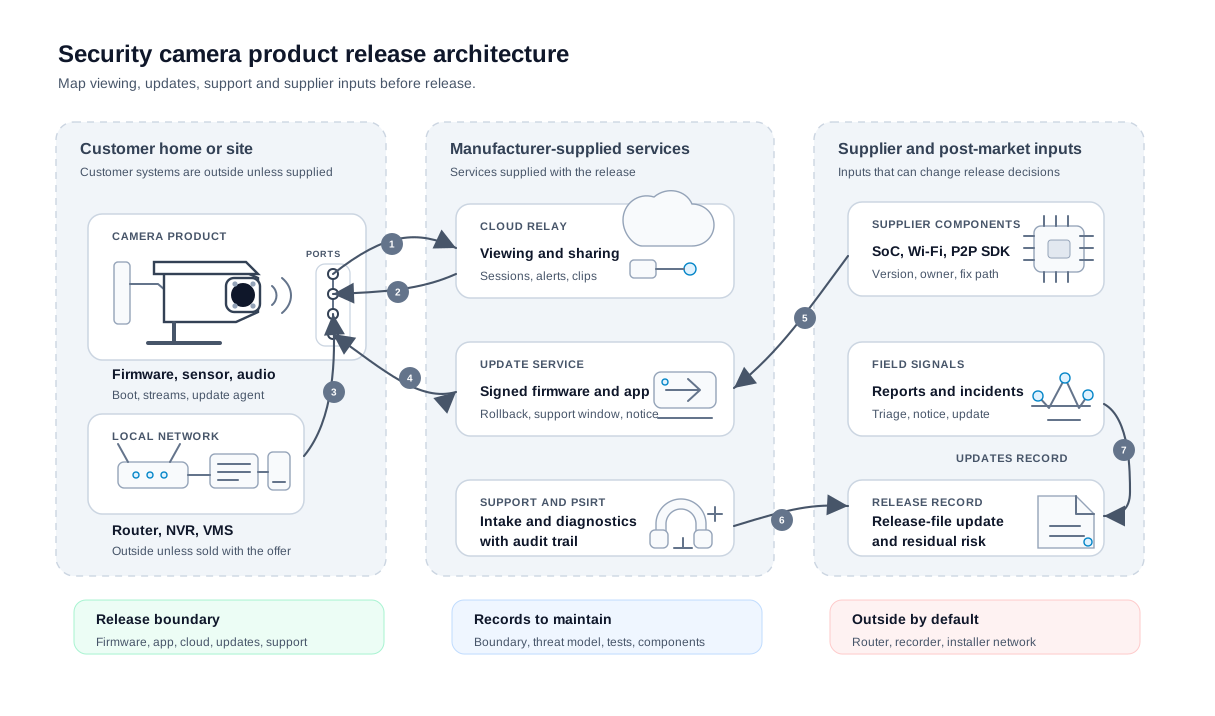
Read the diagram as a release-file map, not as a required deployment pattern. The manufacturer still needs to write the exact variant boundary for its own camera, app, cloud service, update path and support model.
- Video and control path. Identify every path that can view, store, export or control video: local stream, web UI, app session, cloud relay, sharing link, support export and NVR or VMS compatibility claim.
- Local exposure. Scan the camera after setup and after update. Show which services are reachable, which require authentication, and which stream or admin paths remain disabled.
- Customer systems. Treat the router, installer network, third-party recorder, external identity provider and monitoring centre as outside the camera maker's product unless the maker supplies that layer as part of the offer.
- Backends supplied by the maker. Rule in or out the account service, signing pipeline, event or notification service, support portal, paid feature flag service and any cloud ML path.
- Update authority. Treat update authority as a two-way exchange: the camera checks or receives update metadata, and the update service returns a signed firmware or app package for that exact variant. Keep signed-update, recovery-slot, downgrade-rejection and user-notification records with the release.
- Supplier inputs. Give the SoC, Wi-Fi module, media stack, AI model, P2P SDK and bootloader an owner, version, advisory watch and release decision.
- Post-market loop. Vulnerability reports, severe incidents, supplier advisories and field failures should update the threat model, residual-risk record, technical file and next release gate.
Worked camera risk assessment
Read the rest of this section as one worked camera example rather than a checklist to copy. The intent is to show the depth of decision a camera maker should be able to defend for one specific variant: the chipset and module choices, the firmware build, the cloud relay, the OTA channel, the supplier advisories you actually watch, the sales channel you signed up for and the support window you committed to.
What product are we assessing?
Illustrative example product, not a real device: ExampleCo IndoorCam X1, an indoor smart-home camera sold in the EU for household security monitoring. It records 1080p video and audio, stores clips on a microSD card, streams live video to the owner through a mobile app, exposes a local web admin interface during setup, uses BLE for first-use onboarding, connects by Wi-Fi, and receives signed firmware updates from the manufacturer.
The product boundary for this example includes the camera hardware, embedded firmware, microSD recording, mobile app pairing flow, manufacturer cloud relay, account service, OTA update service, security advisory process, and vulnerability-reporting contact. It does not include the customer's router, third-party VMS/NVR, home automation platform, or a professional monitoring centre.
The product is intended for non-technical household users in an indoor home environment. It is not intended for industrial CCTV, public-space surveillance, access control, biometric authentication or identity verification, workplace monitoring, or critical-infrastructure security operations.
Before writing the threat table, test the three camera paths that usually drive the risk assessment: video custody, device identity and post-setup exposure. These diagrams turn the worked example into engineering questions instead of a generic threat list.
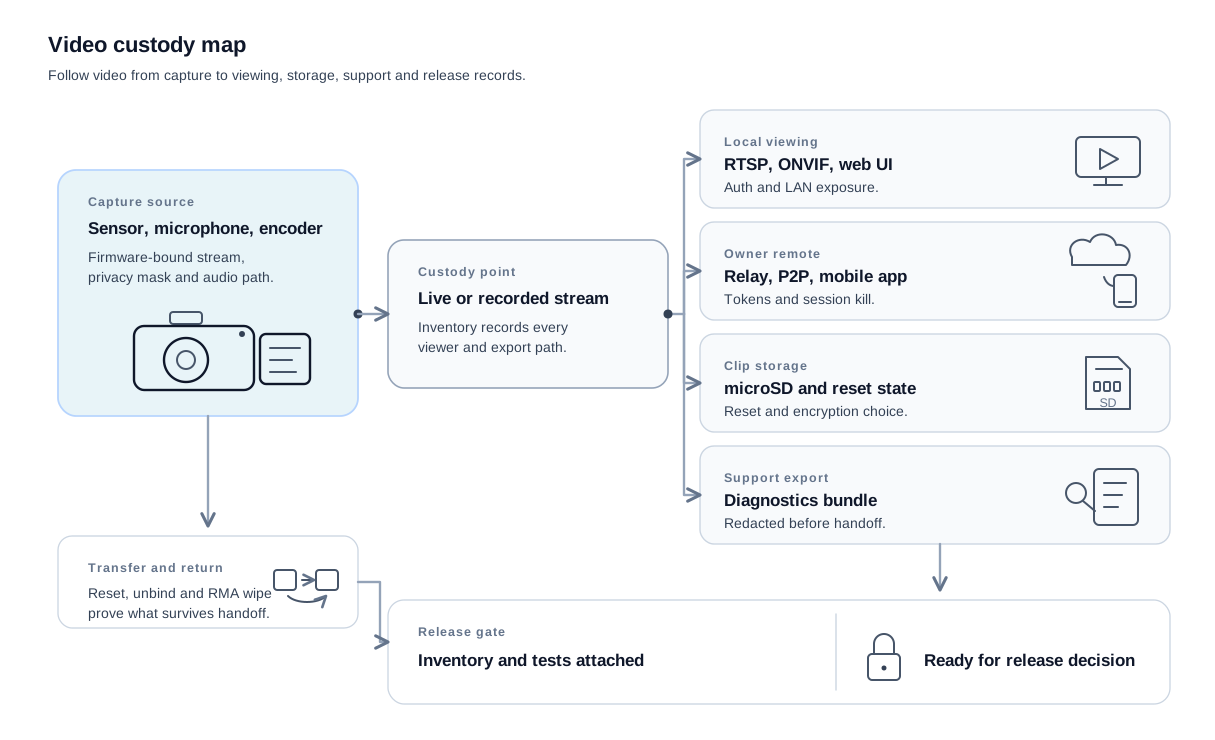
Video custody details: the source is the camera sensor, microphone and encoder, with image tuning blobs, audio path, privacy mask, AI detection inputs and stream profiles tied to a firmware build. The local viewing path includes ONVIF, RTSP, web preview or browser and is verified by an authentication and exposure scan. The remote viewing path includes cloud relay, P2P SDK or owner app and is verified by a token scope and relay test. The local media path includes microSD clips and removable storage and is verified by reset and card-removal testing. The support path includes support bundle and diagnostics export and is verified by a redaction checklist.
Reset, unbind and RMA wipe tests prove which video, tokens and account links are removed before resale, refurbishment or support handoff.
Ownership is a separate check from video custody. A camera can have a protected stream and still fail if an old owner, shared user or recovered phone keeps access after transfer.
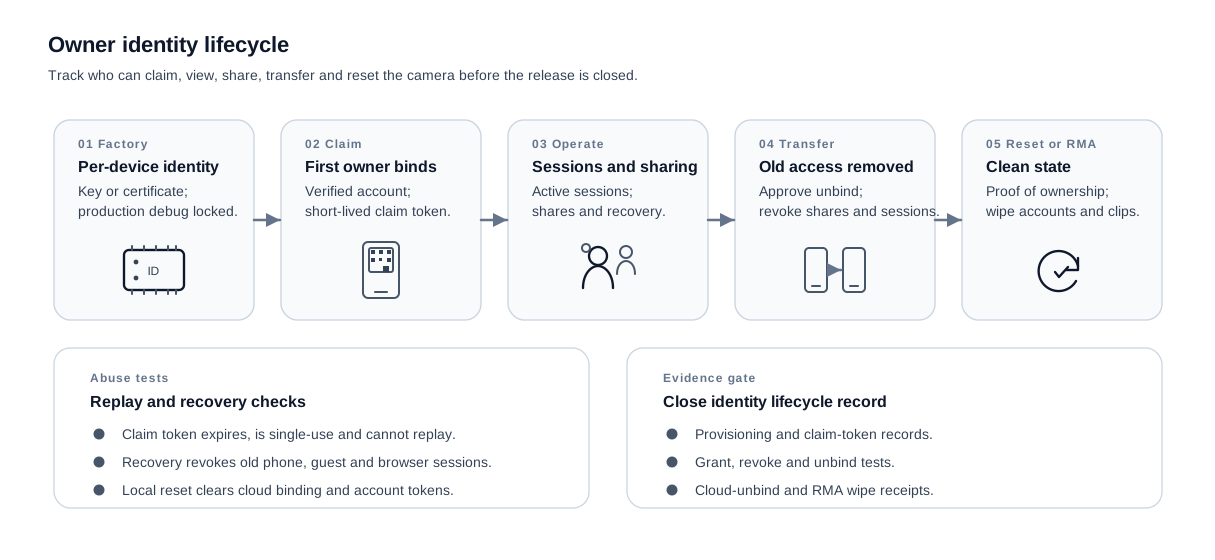
Identity lifecycle details: provisioning creates the camera key or certificate, records the hardware identity and locks production debug access. Owner setup uses a verified account plus a single-use short-lived QR, BLE or app claim token and closes the first-use window after the camera is bound. Normal operation uses the same revocation model for password reset, account recovery, lost-phone recovery, family sharing, guest viewers and browser sessions. Owner transfer requires an authorised unbind path, removes the old account, revokes shared users and kills active sessions before the camera can be claimed again. Factory reset, RMA and refurbishment remove the account link, credentials, clips and diagnostics according to the product design; RMA handling should not become a theft-laundering path.
Abuse tests: a setup token expires, is single-use and cannot be reused by a nearby attacker after owner claim; an old phone, guest user or browser session cannot keep live or recorded access after recovery; and local reset does not leave cloud binding, account tokens or clips behind.
After ownership is tested, check what is still reachable from the network, the app, removable media and support workflows. This keeps the exposure review tied to the actual shipped behavior instead of a generic port-scan result.
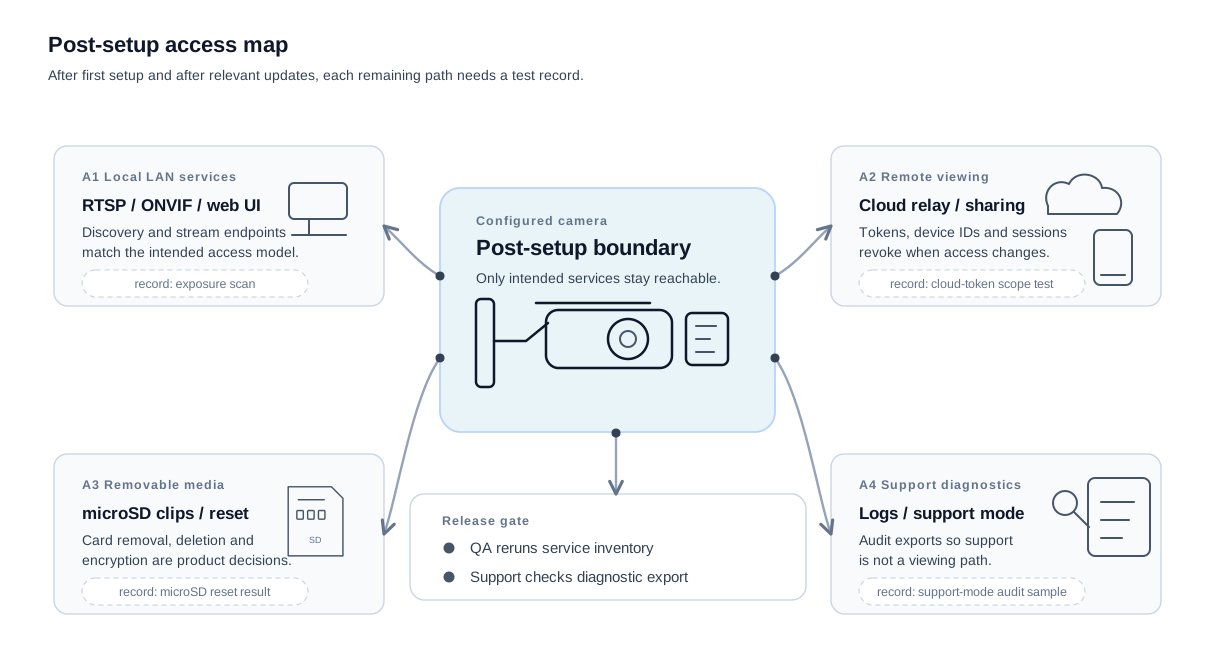
Access-surface details: local LAN services include RTSP, ONVIF, web UI and discovery endpoints, and the release record is the exposure scan. Remote viewing includes cloud relay, sharing and device identity, and the release record is the cloud-token scope test. Removable media includes microSD clips, reset behavior and storage decisions, and the release record is the microSD reset result. Support diagnostics include logs, crash dumps and support mode, and the release record is the support-mode audit sample.
What assets are we protecting?
Cameras protect very different things in the same housing. A recorded clip of a child's bedroom, an owner account that can pan the lens, and a firmware-signing key that controls every device shipped this year all live behind one product. List them as separate assets first, because the control set, the test evidence and the release record diverge sharply across them.
| Asset | Why it matters | Where it lives |
|---|---|---|
| Live and recorded video/audio | Exposes private rooms, routines, visitors, children, pets, and conversations | Sensor, RAM, encoder, microSD, stream buffer, cloud relay |
| Owner account and recovery factor | A takeover can grant remote viewing, device reset, and sharing changes | Mobile app, identity service, email/SMS recovery path |
| Device-to-cloud credential | Persistent trust token; difficult to rotate across a deployed fleet | Secure element or protected storage, account binding service |
| Firmware-signing trust anchor | If broken, the update channel can become a malware channel | Boot chain, keystore, signing service, release pipeline |
| Local-network position | The camera sits inside the household LAN and can see local peers | Wi-Fi interface, DHCP lease, mDNS/SSDP view |
| Diagnostic and support bundle | Can leak serial numbers, account IDs, network names, and crash traces | Device logs, support portal, internal support tooling |
| User instructions and support date | Drives safe setup, update expectations, and end-of-support handling | Packaging, web manual, app UI, product listing |
Where are the main trust boundaries?
A camera sits in five places at once: the device itself, the microSD card that anyone in the room can remove, the home network it shares with phones and unknown IoT peers, the maker backend that touches every camera in the field, and the owner phone or browser that holds the live session. Each one changes the attacker opportunity and demands a different control surface, so the trust-boundary model lists them separately even though they connect.
| Environment | Expected protection | Why it changes likelihood |
|---|---|---|
| Inside the camera | Physical access is limited, but repair, theft, resale, and debug pads exist | Lower remote likelihood, higher consequence if keys are extractable |
| microSD/local media | Anyone with room access may remove or copy the card | Local access is plausible in homes with guests, cleaners, tenants, or resale |
| Home network | Shared with laptops, phones, TVs, printers, and unknown IoT devices | A compromised peer can attack local admin, discovery, or stream services |
| Manufacturer backend | Internet-facing and shared across the installed fleet | A backend mistake scales from one household to many |
| Owner endpoint | Phones and browsers are exposed to phishing, malware, and account reuse | Account compromise often bypasses device hardening |
Which threats should be evaluated first?
This example starts with sixteen product-specific threats. The point is not to be exhaustive; it is to show the level of traceability a manufacturer should be able to defend.
| ID | Threat scenario | Asset at risk | Entry point |
|---|---|---|---|
| T1 | A shared or predictable first-use secret lets an attacker claim the camera before the owner finishes setup | Owner account, video stream | BLE onboarding / local setup |
| T2 | The local web admin interface accepts weak credentials or stays open after setup | Configuration, stream access | Home network |
| T3 | A stolen mobile-app token remains valid after password reset and continues to open the camera feed | Owner account, live video/audio | Owner endpoint / cloud relay |
| T4 | P2P fallback, STUN/TURN/ICE handling, UPnP or hole punching exposes the camera directly when the relay path fails or is blocked | Firmware services, stream access | Internet-adjacent relay path |
| T5 | ONVIF/RTSP answers on the LAN with weak authentication or discoverable stream URLs | Live video/audio | Home network |
| T6 | The recovery slot accepts an unsigned, old, or downgraded firmware image | Firmware integrity, signing trust anchor | OTA / recovery path |
| T7 | UART/JTAG pads permit boot-time access during theft, repair, or resale | Device secrets, firmware, logs | Physical debug access |
| T8 | microSD clips are readable after card removal or after the camera is resold | Recorded video/audio | Local media |
| T9 | BLE onboarding exposes the Wi-Fi credential or device pairing secret to a nearby attacker | Wi-Fi credential, owner account | BLE setup window |
| T10 | Support bundles include serial, account, SSID, token fragments, or private crash traces | Diagnostic data, account linkability | Support upload |
| T11 | A supplier vulnerability in the Wi-Fi module or media stack is not detected during the support period | Firmware, availability, stream confidentiality | Supplier advisory gap |
| T12 | RMA or resale reset fails to wipe account binding, clips, or device credentials | Owner account, recorded media, device-to-cloud credential | Return path |
| T13 | Discovery services reveal model, firmware, serial or stream metadata to every device on the LAN | Device fingerprint, stream exposure | ONVIF / WS-Discovery / mDNS |
| T14 | The RTSP streamer is protected differently from the web UI, leaving a live stream reachable after admin hardening | Live video/audio | Local stream service |
| T15 | A third-party P2P or media SDK flaw permits device UID prediction or enumeration, device impersonation or stream-session compromise | Live video/audio, device credential | Cloud relay / SDK |
| T16 | Camera firmware uses a supplier ISP, Wi-Fi or AI blob that is not in the SBOM watch process | Firmware integrity, vulnerability handling | Supplier firmware |
How should the initial risks be ranked?
Use a simple internal rubric before choosing controls. In this example, likelihood is based on exposure and attacker opportunity; impact is based on privacy harm, fleet scale, persistence, and whether the threat compromises a security mechanism. The exact labels matter less than the rationale written next to each decision.
Use a release-gate ladder so every camera risk does not receive the same decision:
| Gate decision | Meaning for this camera release |
|---|---|
| Block release | The camera does not ship until the failing test passes: pairing, stream authentication, signed-update verification, RMA wipe or post-setup service exposure scan, depending on the threat. |
| Block unless documented | Release may proceed only when a compensating control, variant-specific limitation or installer-mode rationale is written, reviewed and pinned to the camera release file. |
| Ship with monitoring | The camera ships, but the release file names the active monitoring signal (supplier CVE feed, P2P SDK advisories, abuse telemetry) and the engineer who owns it during the support period. |
| Transfer to guidance | The exposure depends on the home network, owner phone or third-party recorder outside the camera maker's offer, so the file keeps installer or user guidance instead of trying to control the customer side. |
| Accept | Some camera surfaces (documented discovery responses, LAN metadata) carry inherent residual risk, so the file records the minimisation evidence and the rationale for accepting what remains. |
| ID | Likelihood | Impact | Gate decision | Why |
|---|---|---|---|---|
| T1 | Medium | High | Block release | First-use takeover is realistic and undermines ownership |
| T2 | High | Medium | Block release | Home LANs contain untrusted peers and reused passwords |
| T3 | Medium | High | Block release | Account token theft gives remote viewing without touching the camera |
| T4 | Low | High | Block unless documented | Rare path, but direct exposure can scale; a shipped product needs a documented relay and NAT traversal decision |
| T5 | Medium | High | Block release | Local stream exposure is a direct privacy failure |
| T6 | Low | High | Block release | Update compromise is persistent and fleet-wide |
| T7 | Medium | Medium | Block unless documented | Physical debug is plausible during theft, repair, or resale; the release needs a debug-lock or service rationale |
| T8 | High | Medium | Block unless documented | Local card removal is common; either protect clips or clearly document the removable-media limitation |
| T9 | Medium | High | Block release | Onboarding is short-lived but exposes the home network credential |
| T10 | Medium | Medium | Block unless documented | Support data leaks can be hard to notice; support export must be minimised, redacted or explicitly disabled |
| T11 | Medium | High | Ship with monitoring | Supplier CVEs are expected during the support period; the release needs an owner and advisory watch |
| T12 | Medium | High | Block release | Return and resale paths are foreseeable for consumer devices |
| T13 | Medium | Medium | Accept | Some LAN metadata is inherent to documented discovery protocols; the residual risk is accepted only with exposure minimisation and user guidance for optional discovery where supported |
| T14 | Medium | High | Block release | Stream authentication cannot be weaker than the documented access model |
| T15 | Low | High | Ship with monitoring | SDK or relay weaknesses can affect many devices, so the release needs version ownership and abuse monitoring |
| T16 | Medium | High | Block unless documented | Closed or supplier-maintained blobs need a release owner, advisory channel and update path, or a written residual-risk decision |
What design controls change the risk picture?
Tie each control row to a specific camera test, not a generic secure-development checklist. The release file should be able to point from a threat ID to the exact pairing test, stream-authentication scan, signed-update verification log, post-setup service inventory or RMA wipe record that proves the control is running on the shipped camera build.
| Threats | Design control | Evidence the manufacturer should keep |
|---|---|---|
| T1, T2 | Per-device setup secret, forced owner enrolment, no shared default password, setup interface closes after enrolment | Setup test log, credential policy, negative test for unauthenticated admin access |
| T3 | Short-lived app tokens, device-bound sessions, server-side revocation on password reset, login anomaly monitoring | Token lifetime policy, revocation tests, account-recovery abuse tests |
| T4, T5 | Disable UPnP by default, authenticated relay, authenticated ONVIF/RTSP, service inventory after setup | Network exposure scan, stream-authentication tests, relay configuration review |
| T6 | Secure boot, signed OTA, monotonic version counter, recovery-slot signature check, rollback policy | Boot-chain evidence, update verification tests, downgrade rejection tests |
| T7 | Production fuses for debug, sealed or documented debug pads, no secrets in readable UART output | Hardware production checklist, debug-lock verification, teardown risk note |
| T8 | Encrypted microSD recording where the camera variant supports it (Eufy, TP-Link Tapo on supported models); secure erase on factory reset; clear user warning printed in the manual and in-app for variants that record unencrypted | Storage design note, reset test, user-instruction screenshot, in-app warning capture |
| T9 | Authenticated BLE pairing, short pairing window, Wi-Fi secret never transmitted in clear, pairing rate limits | Pairing protocol review, RF test, failure-mode test |
| T10 | Support bundle minimisation, token redaction, user consent before upload, retention limit | Support schema, redaction tests, support workflow evidence |
| T11 | SBOM monitoring, vendor advisory watch, affected-component triage, signed update release process | SBOM diff log, supplier advisory record, triage decisions |
| T12 | RMA wipe workflow, cloud unbind, credential rotation on reset, refurbished-device checklist | Return-line checklist, reset evidence, cloud unbind audit |
| T13, T14 | Post-setup service inventory, authenticated stream URLs, discovery-response minimisation, profile/version test evidence | Exposure scans, ONVIF/RTSP authentication tests, discovery-response audit |
| T15 | P2P SDK inventory, session-token scope, device UID entropy, SDK advisory watch, impersonation and abuse-case tests | SDK version record, UID enumeration test, device-impersonation test |
| T16 | Supplier firmware inventory for ISP, Wi-Fi, encoder and AI components; component owner and update path | Supplier bill of materials, advisory watch record, release decision log |
What residual risk remains after controls?
Controls do not close the file. After the camera ships, the maker still runs the actively managed risks: the firmware update channel, owner-account takeover paths and the long tail of supplier CVEs in the Wi-Fi stack, media libraries and P2P SDKs that surface throughout the support period. The residual record is credible only when the maker can point to live monitoring of those signals, triage decisions for new advisories, signed updates that actually reached the installed cameras, owner notices that went out, and a recorded corrective action behind each one.
| Residual area | Why it remains | Operating evidence |
|---|---|---|
| Compromised owner endpoint | The manufacturer cannot fully control the user's phone, browser, email, or password hygiene | MFA support, token revocation, suspicious-login alerting, user guidance |
| Supplier vulnerability discovered after release | Media libraries, Wi-Fi firmware, kernels, and TLS libraries will continue to receive CVEs | SBOM watch, supplier advisory intake, impact analysis, patch record |
| Local physical access | A camera in a home can be stolen, resold, repaired, or accessed by guests | Reset workflow, debug-lock evidence, storage warning, RMA wipe record |
| Network exposure drift | Firmware updates, relay changes, or feature flags can reopen services | Release-by-release exposure scan, service inventory, change approval |
The release gate is the risk register itself. Do not add a separate "security reviewed" card that restates the same work. At sign-off, the release owner should be able to point from the blocked or conditional threats to the closing evidence: pairing and stream tests for T1/T2/T5/T14, token revocation for T3, signed-update tests for T6, storage/reset evidence for T8, RMA wipe evidence for T12, and supplier monitoring for T11/T16.
Camera development ownership from concept to support
Lead ownership shifts as the camera moves from product definition to live support. Use this handoff to assign one lead, one maintained record and one review gate at each stage while the product changes.
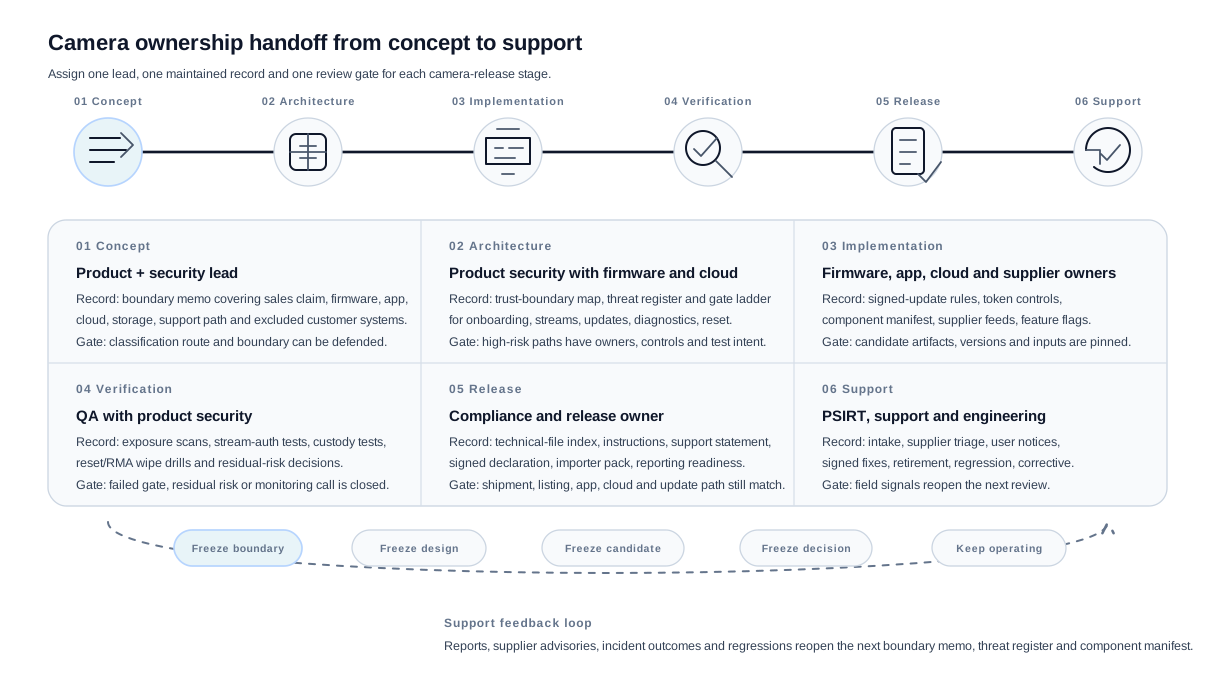
Ownership details: Product and security own the variant boundary memo in concept. Product security with firmware and cloud own the trust-boundary map, threat register and gate ladder in architecture. Firmware, cloud, app and supplier owners maintain signed-update rules, token and session controls, component manifest, supplier advisory feeds and feature-flag decisions during implementation. QA with product security maintains exposure scans, stream-authentication tests, video-custody tests, reset or RMA wipe drills and residual-risk decisions during verification. Compliance and the release owner maintain the release pack, technical-file index, instructions, support-period statement, signed declaration, importer pack and reporting readiness. PSIRT, support and engineering maintain intake, supplier advisory triage, user notices, signed fixes, endpoint retirement, regression tests and corrective-action records after release.
Handoff details: freeze the boundary before architecture work, freeze the design intent before implementation, freeze the candidate before verification, freeze the decision before release and keep the release operating through the support period. Incoming reports, supplier advisories, incident outcomes and regression results reopen the next boundary memo, threat register and component manifest.
Manufacturer evidence map
A reviewer or notified-body assessor walks a camera technical file the way an installer walks the box: from the labelled product, through the supplied digital elements, to the support evidence the buyer is promised. The rows below name the records camera makers keep current for that walk; each row should be a maintained file in the product folder, not a sampled screenshot pulled before sign-off.
| Evidence area | What to capture for a security camera |
|---|---|
| Product identity | Model, firmware versions, companion app, cloud service, hardware revisions |
| Intended purpose | Whether the product is sold for home security, baby monitoring, doorbell security, or professional surveillance |
| Risk assessment | Camera access, video confidentiality, credential setup, local network exposure, cloud API exposure |
| SBOM and hardware component evidence | Firmware packages, embedded Linux/RTOS components, image-processing libraries, Wi-Fi/Ethernet module firmware, SoC and secure element where present |
| Secure defaults | No shared default password, secure first-use setup, authenticated admin access, protected remote access |
| Update mechanism | Signed firmware updates, rollback strategy, update availability through the support period |
| Vulnerability handling | CVD policy, reporting contact, triage workflow, security-advisory process |
| User instructions | Secure installation, account setup, update settings, end-of-support disclosure |
| Traceability and contact | Camera model and serial schema, batch identifier, packaging marks, EU manufacturer or importer contact, the support-period end date printed where the buyer can read it before purchase, and a published vulnerability-reporting address answered by a human security team |
Conformity-assessment route
Choose the conformity route after the camera boundary, risk assessment, controls and residual risks are clear. Otherwise the route decision can outrun the engineering record.
Important Class I does not automatically require a Notified Body in every case. The internal-control route is available only when the required standards, specifications or schemes are fully applied for the applicable requirements.
Confirm whether relevant harmonised standards, common specifications or EU certification schemes at assurance level at least substantial exist and cover the applicable essential requirements. If they do not exist, are only partly applied, or do not cover all relevant requirements, use Module B+C or Module H.
For a real camera release, prepare the release file as if a third-party review may be needed, then confirm the route once the applicable standards and schemes are clear for the exact camera product.
Keep the selected route with the release sign-off record, including the references relied on, the requirements they cover, and any gaps that forced a third-party route.
Manufacturer release sign-off
Before the camera is released for the EU market, the sign-off should bring the classification, boundary, threat model, controls, update path and post-market process into one decision. The table below is the short release file a reviewer should be able to navigate from.
| Release question | Camera-specific evidence |
|---|---|
| Why is this product classified as a smart-home security camera? | Intended-use statement, sales channel, installation context, product variants, and the classification rationale |
| What exactly is the product with digital elements? | Camera body, firmware, local interfaces, mobile app, cloud processing supplied with the product, update service, and excluded third-party deployment systems |
| What are the highest-risk access paths? | Admin UI, ONVIF/RTSP, local network discovery, cloud APIs, account recovery, remote viewing, microSD access, debug ports, and service credentials |
| What has been secured by default? | No shared default password, protected first-use setup, authenticated admin access, exposed-services review, encryption decisions, and secure remote access |
| How will the camera be updated safely? | Signed firmware, key custody, rollback behavior, partial-flash recovery, update availability, user notification, and free security updates during the support period |
| How will vulnerabilities be handled after shipping? | Public contact, CVD policy, triage workflow, SBOM monitoring, supplier advisory watch, security-advisory process, 24-hour early-warning readiness, 72-hour notification readiness, and final-report evidence |
Economic-operator handoff checks
The release file should make the handoff from manufacturer to importer, distributor and private-label seller testable. For cameras, the weak point is usually not the CE mark alone; it is whether the shipment, listing, app, cloud service and update channel still match the assessed release.
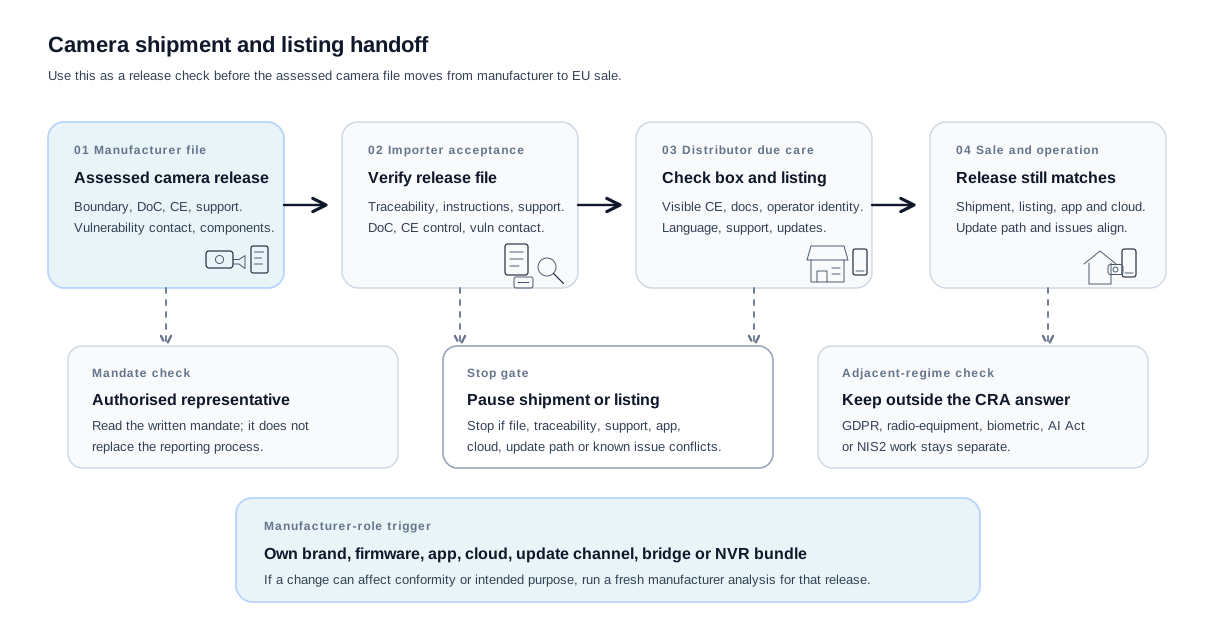
Economic-operator handoff details: the manufacturer or private-label maker owns the manufacturer file for the exact camera release. The importer verifies the classification rationale, declaration, CE marking control, technical-file index, support-period statement, vulnerability-reporting contact, component-inventory handling, destination-language instructions and importer identity before placing the shipment on the EU market. The distributor checks visible due-care signals before sale, including CE marking, supplied documents, manufacturer and importer traceability, destination-language instructions, support and update statements, online listing consistency and known non-conformity signals.
Stop conditions: pause shipment or listing if the release file, traceability, support statement, app or cloud dependency, update channel or known vulnerability gives reason to believe the release is non-conforming. Read any authorised-representative mandate separately from importer or distributor due care. Manufacturer-role trigger: run a fresh manufacturer-role analysis when own branding, firmware, app, cloud, update-channel, bridge, NVR bundle or intended-use changes can affect conformity or intended purpose. Keep GDPR, Radio Equipment Directive cybersecurity, biometric, AI Act and NIS2 questions separate from the CRA classification answer.
Use the next figure as a role checklist. The first handoff diagram shows the shipment and listing flow; this one separates the checks owned by the importer, distributor, authorised representative, private-label seller and adjacent-regime reviewer.
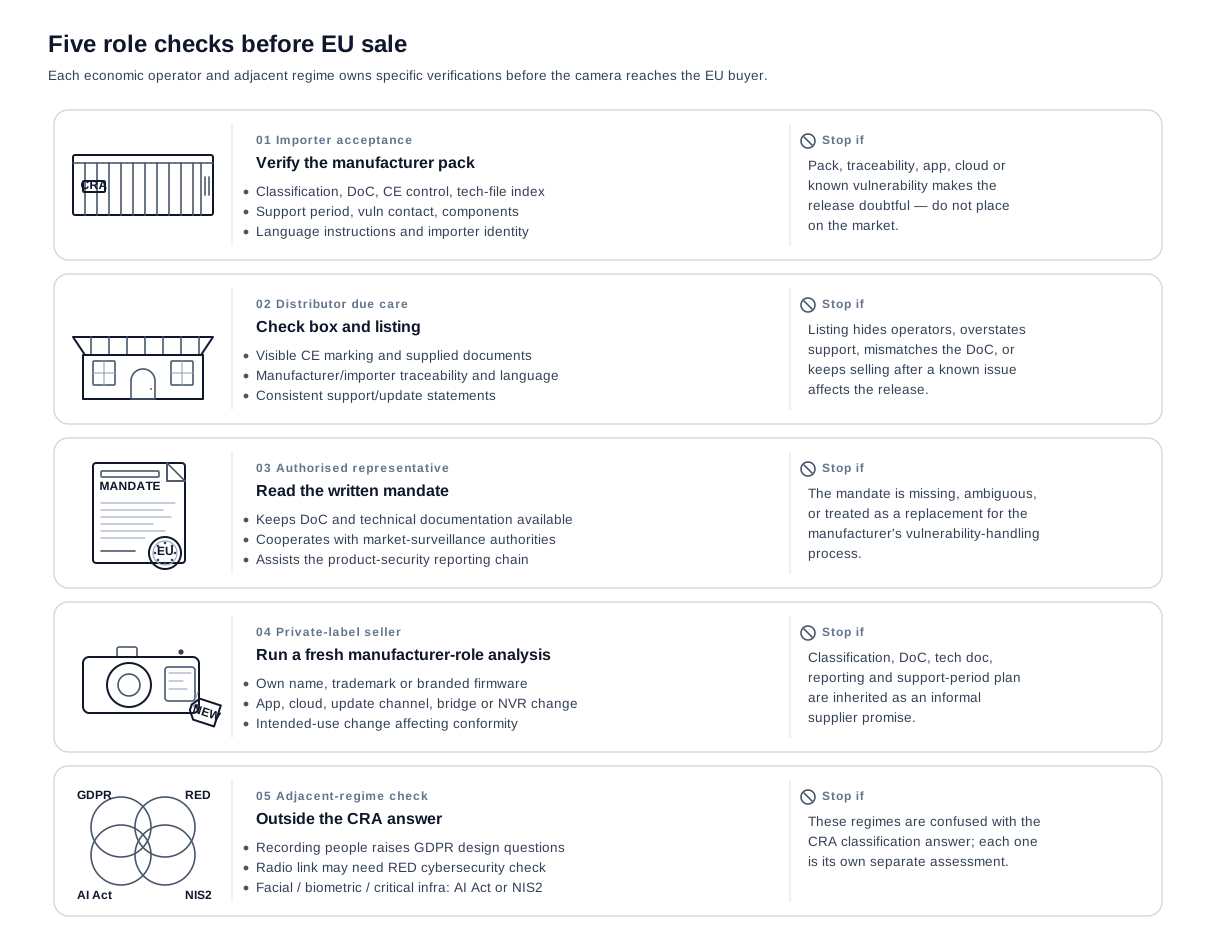
Each role panel pairs the verifications the operator must run with the stop condition that pauses shipment, listing or release. The importer and distributor sit on the CRA flow itself. The authorised representative applies only when the manufacturer is non-EU and is read separately from importer or distributor due care. Private-label seller checks may create a manufacturer role if a change can affect conformity or intended purpose; classification, declaration of conformity, technical documentation, reporting process and support-period plan cannot be inherited as an informal supplier promise. Adjacent regimes (GDPR, Radio Equipment Directive cybersecurity, AI Act, NIS2) stay outside the CRA classification answer and need their own separate assessments. If a camera is also a high-risk AI system, the AI Act runs in parallel but the CRA cybersecurity work can be reused for it: see how the CRA and AI Act overlap.
Frequently Asked Questions
Are smart security cameras Class I or Critical under the CRA?
Smart-home security cameras are typically Important Class I when their core function is smart-home physical security. A camera is not Critical merely because it processes video or sits on a sensitive network.
Classification record: a memo that names the exact camera variant, sales claim, intended security function, supplied digital elements and route rationale.
Does a smart-home security camera need a Notified Body?
Not always. The practical test is whether the manufacturer can fully rely on the applicable standards, common specifications, or qualifying cybersecurity certification scheme coverage for the camera's essential cybersecurity requirements. If that coverage is missing or only partial, plan for the third-party route instead of assuming internal control.
Conformity route record: list the references relied on for the exact camera product, the requirements they cover, any gaps, and the selected route.
Is a professional CCTV camera or NVR automatically in the same category?
No. Do not classify professional surveillance by the word "camera" alone. A CCTV camera, VMS or NVR can still be a product with digital elements and still need CRA security work, but the route depends on intended use, supplied elements and the function the customer relies on.
Boundary record: a professional-surveillance variant memo covering the camera, recorder, VMS, installer cloud, remote access path and any separate products supplied with the offer.
What if the camera includes facial recognition, access control, firewall, or VPN features?
Treat that as a classification warning sign. If the camera is mainly a smart-home security camera, those features may be part of the camera risk assessment. If the product is mainly an access-control reader, biometric authentication device, VPN gateway, firewall, IDS/IPS, or another listed cybersecurity product, classify that core function first and do not force the product into the camera category. This matters because some categories carry a stricter route; for example, firewalls and IDS/IPS are Class II.
Recheck trigger: open a separate core-function check when the camera controls identity, access, network filtering, VPN access or intrusion detection rather than only video monitoring.
Does cloud video storage change the product boundary?
Cloud storage does not automatically change the class. If manufacturer-supplied cloud processing is designed by or under the responsibility of the manufacturer, and the camera would not perform one of its functions without it, treat that processing as part of the product boundary, evidence, and risk assessment. The product classification still follows the camera's core functionality unless another listed function is primary.
Boundary record: a cloud-dependency map showing which cloud services are supplied with the camera, which functions fail without them, what data they process and which systems are outside the manufacturer's offer.
Should ONVIF, RTSP or the local web admin stay enabled after setup?
Only if the release has a documented access model for that surface. A consumer camera can expose local streaming or administration for legitimate setup, installer or recorder use, but the release file should show whether the surface remains reachable after enrolment, which authentication protects it, whether transport encryption is used, and what user setting or variant claim justifies it.
Test artifact: post-setup and post-update service scans, ONVIF/RTSP authentication tests, discovery-response review and the release decision for each local surface.
When should the risk assessment be updated?
Update it whenever the released camera state changes in a way that affects trust: a new ONVIF profile, remote viewing mode, account-recovery flow, cloud relay, OTA channel, chipset, firmware base, mobile app authentication change, support-bundle field, or factory-reset behavior. A release note is not enough if the changed feature reopens an attack path.
Recheck trigger: any feature or supplier change that alters access, update authority, stored video, account binding, support data or reset behavior reopens the boundary and risk assessment.