When Importers Become Manufacturers Under CRA: Role Escalation Explained
A practical guide to CRA Article 22 role escalation. Know when rebranding or modifying products triggers full manufacturer obligations.

In this article
- Summary
- The Two Triggers for Role Escalation
- What Counts as "Substantial Modification"?
- Decision Tree: Am I Still an Importer?
- What Manufacturer Status Means
- Practical Scenarios
- Strategies for Staying as Importer
- Preparing for Manufacturer Status
- Common Mistakes
- Role Assessment Checklist
- Frequently Asked Questions
- How CRA Evidence Helps
You import a router from Asia. You put your company logo on the box. Congratulations: you're now a manufacturer under the CRA, with full conformity assessment obligations.
This article covers exactly when importers cross the line into manufacturer territory, and what that means for your compliance burden.
Summary
- Importers become manufacturers when: (1) placing products under own name/trademark, or (2) making substantial modifications
- "Substantial modification" = changes affecting cybersecurity or product purpose
- Role escalation triggers full manufacturer duties: Article 13 (all manufacturer obligations, including risk assessment under Annex I Part I), Article 14 (vulnerability notification), Article 31 and Annex VII (technical documentation), Article 32 (conformity assessment), and Article 28 (EU Declaration of Conformity)
- Exemption: Security patches that don't change product function
- Plan for this: Either maintain importer status or prepare for manufacturer compliance
Important: If you substantially modify a product (rebrand, change firmware, integrate into a larger system), you may be reclassified as the manufacturer under the CRA with all corresponding obligations.
Tip: Document your exact role in the supply chain. Ambiguity about whether you're an importer or manufacturer creates compliance risk.
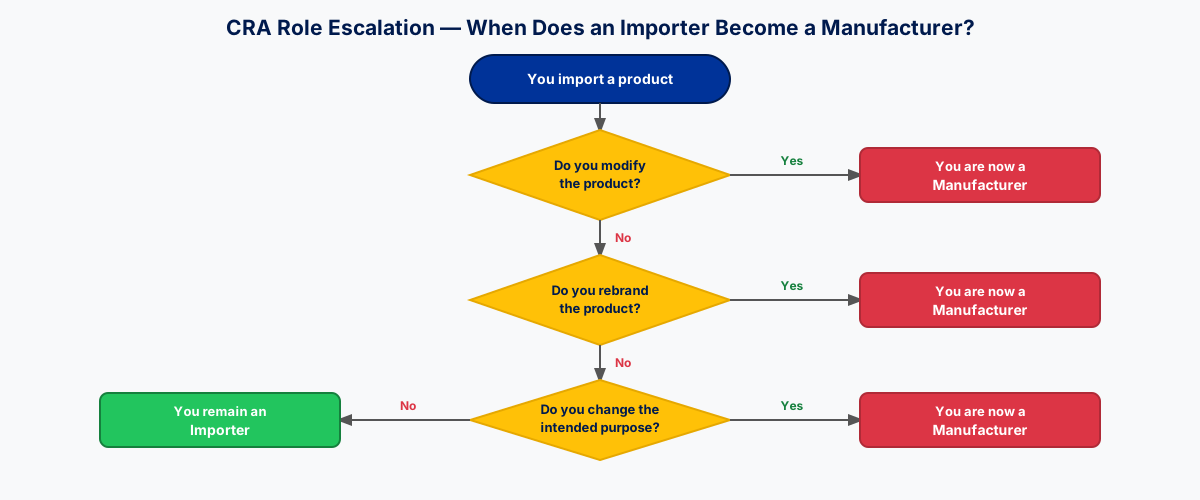
The Two Triggers for Role Escalation
Article 22 of the CRA establishes when an importer (or distributor) is treated as a manufacturer:
Trigger 1: Own Name or Trademark
Placing a product on the market under your own brand makes you the manufacturer, regardless of who actually designed and built it.
You trigger this when:
- Your company name appears as "manufacturer" on packaging
- Your trademark/logo is on the product
- Marketing materials present you as the product source
- Customers would reasonably believe you made the product
Examples:
| Situation | Manufacturer? | Why |
|---|---|---|
| Import router, sell under "AcmeTech" brand | Yes | Own trademark |
| Import camera, add "Distributed by AcmeTech" | No | Distributor role clear |
| Import device, replace all manufacturer branding with yours | Yes | Own name/trademark |
| Import device, add your sticker alongside original branding | Possibly | Depends on prominence |
Trigger 2: Substantial Modification
Making changes that affect the product's intended purpose or its compliance with CRA requirements.
The test: Would the original conformity assessment still be valid after your changes?
If your modifications mean the original manufacturer's compliance work no longer applies, you've made a substantial modification.
What Counts as "Substantial Modification"?
The CRA doesn't provide an exhaustive list. The principle is: changes affecting security posture or intended use.
Definitely Substantial
| Modification | Why It's Substantial |
|---|---|
| Custom firmware installation | Changes security architecture |
| Adding remote management features | New attack surface |
| Hardware changes affecting security | Alters risk profile |
| Integrating third-party security modules | Changes trust boundaries |
| Changing authentication mechanisms | Core security function |
| Adding network connectivity to offline product | Fundamental purpose change |
| Replacing cryptographic implementations | Security-critical change |
Definitely NOT Substantial
| Modification | Why It's Not Substantial |
|---|---|
| Applying security patches (no function change) | Explicitly exempted by CRA |
| Language localization of documentation | Cosmetic only |
| Packaging changes (no product change) | Not a product modification |
| Adding compatible accessories | Original product unchanged |
| Cosmetic changes (color, finish) | No security impact |
| Stocking/warehousing | No modification at all |
Gray Areas (Assess Carefully)
| Modification | Considerations |
|---|---|
| Configuration changes | Does it affect security defaults? |
| Pre-installed additional software | Does it change attack surface? |
| Hardware accessories that integrate | Do they affect security functions? |
| Regional adaptations | Do they change security-relevant behavior? |
| Bundling multiple products | Are security boundaries clear? |
Decision Tree: Am I Still an Importer?
START: Placing product on EU market
|
+- Under original manufacturer's brand?
|   |
|   +- YES → Making any modifications?
|   |         |
|   |         +- NO → You're an IMPORTER
|   |         |       (Standard importer obligations apply)
|   |         |
|   |         \- YES → Does modification affect:
|   |                   • Intended purpose or use?
|   |                   • Cybersecurity compliance?
|   |                   • Security architecture?
|   |                   |
|   |                   +- YES to any → You're a MANUFACTURER
|   |                   |               (Full manufacturer obligations)
|   |                   |
|   |                   \- NO to all → You're an IMPORTER
|   |                                  (Document your analysis)
|   |
|   \- NO (your brand) → You're a MANUFACTURER
|                        (Full manufacturer obligations)
What Manufacturer Status Means
If you trigger role escalation, you inherit the full set of CRA manufacturer obligations:
Before Market Placement
Risk Assessment (Article 13, Annex I Part I):
- Conduct cybersecurity risk assessment for your modified product
- Document threats, vulnerabilities, and mitigations
- Link risks to security controls
Secure Development:
- Even though you didn't develop the original, you must ensure the product (as modified) meets secure-by-design principles
- Document your modification process and its security considerations
Technical Documentation (Article 31, Annex VII):
- Prepare complete technical file including:
- Product description
- Risk assessment results
- Security architecture (as modified)
- SBOM (including your modifications)
- Conformity assessment evidence
Conformity Assessment (Article 32):
- Determine product classification
- Complete appropriate assessment route (Module A, B+C, or H)
- If original manufacturer used third-party assessment, your modifications likely invalidate it
EU Declaration of Conformity (Article 28, Annex V):
- Issue your own DoC
- You are the responsible manufacturer
- Original manufacturer's DoC no longer applies
- Affix CE marking under your responsibility
- You're declaring conformity, not the original manufacturer
Throughout Support Period
Vulnerability Management (Article 13, Annex I Part II):
- Establish vulnerability handling process
- Monitor for vulnerabilities (including in unmodified components)
- Provide security updates for minimum 5 years
Incident Reporting (Article 14):
- Report actively exploited vulnerabilities to ENISA (24h)
- Report severe incidents (24h)
- You're responsible, even for vulnerabilities in original components
Customer Communication:
- Provide security update notifications
- Maintain support channels
- Handle end-of-life responsibly
Ongoing Obligations
Post-Market Surveillance:
- Monitor your product in the field
- Track vulnerability reports
- Implement lessons learned
Documentation Retention:
- Keep technical file for 10 years after last unit placed on market
- Maintain audit trail of modifications
Practical Scenarios
Scenario 1: White-Label Electronics
Situation: You import generic tablets from Asia and sell them under "AcmeTab" brand.
Analysis:
- Own trademark: Yes → Manufacturer trigger
- Modifications: Even if none, the branding triggers manufacturer status
Result: You're a manufacturer. Full obligations apply.
What you need:
- Risk assessment for the tablet
- Technical file (work with supplier to obtain underlying documentation)
- Your own conformity assessment
- Your own DoC and CE marking
- Vulnerability management process
- 5+ year support commitment
Scenario 2: Pre-Configured Network Equipment
Situation: You import enterprise routers and pre-configure them with custom firewall rules and VPN settings before selling to customers.
Analysis:
- Own trademark: Assume no (sold under original brand)
- Modifications: Configuration changes
- Do changes affect security? Custom firewall rules = security-relevant configuration
Result: Likely substantial modification. You're probably a manufacturer.
Better approach: Work with original manufacturer to offer "configuration profiles" that they validate, keeping you as importer.
Scenario 3: Security Patches Applied
Situation: You import IoT devices. Before sale, you apply the latest security patches from the manufacturer.
Analysis:
- Own trademark: No
- Modifications: Security patches only
- CRA explicitly exempts security patches that don't change intended function
Result: You're still an importer. This is the exempted scenario.
Document: Keep records showing patches were manufacturer-provided and didn't change functionality.
Scenario 4: Firmware Customization for Customers
Situation: You import industrial controllers. For enterprise customers, you install custom firmware with additional features.
Analysis:
- Own trademark: May or may not
- Modifications: Custom firmware = definite substantial modification
Result: You're a manufacturer for those customized units.
Options:
- Maintain two tracks: standard (importer) and customized (manufacturer)
- Work with manufacturer to have custom firmware officially supported
- Accept manufacturer status and build compliance infrastructure
Scenario 5: Hardware Bundling
Situation: You import security cameras and bundle them with third-party NVR (network video recorder) as a "complete system."
Analysis:
- Own trademark: If sold as "AcmeSecurity System," yes
- Modifications: Bundling creates a new "product" if marketed as integrated
- Security boundaries: NVR + cameras = different security profile than cameras alone
Result: Likely manufacturer for the bundled system.
Alternative: Sell as separate products, clearly distinct, with original branding.
Strategies for Staying as Importer
If you want to avoid manufacturer obligations:
1. Maintain Original Branding
Keep manufacturer's name and trademark visible. Your company can be identified as importer/distributor.
2. No Product Modifications
Don't touch firmware, hardware, or security-relevant configuration. What you import is what you sell.
3. Document Everything
Keep records showing:
- Product is unmodified
- Original manufacturer branding maintained
- You verified manufacturer's compliance
4. Work with Manufacturers
If you need customization:
- Have manufacturer make the changes
- Ensure their DoC covers the customized version
- Maintain your importer status
Preparing for Manufacturer Status
If role escalation is unavoidable or strategically desired:
Compliance Infrastructure
Build the capabilities manufacturers need:
| Capability | What It Means |
|---|---|
| Risk assessment competency | People/process to evaluate security risks |
| Technical documentation | Ability to create and maintain technical files |
| Conformity assessment | Module A capability or Notified Body relationship |
| Vulnerability management | Intake, triage, remediation, communication |
| Update distribution | Mechanism to deliver security patches |
| Customer support | Security-focused support for 5+ years |
Supplier Relationships
Even as manufacturer, you depend on original suppliers:
- Technical documentation access: You need underlying details
- Vulnerability information: They may discover issues first
- Component support: Their support affects your ability to maintain product
- Contractual obligations: Ensure they'll support you for your support period
Cost Considerations
Manufacturer status increases costs:
| Cost Category | Importer | Manufacturer |
|---|---|---|
| Conformity assessment | Verify only | Perform (or pay NB) |
| Documentation | Verify existence | Create and maintain |
| Vulnerability management | Notify upstream | Run entire process |
| Updates | Pass through | Develop and distribute |
| Support period | Monitor | Deliver |
| Liability exposure | Lower | Higher |
Model these costs before deciding to trigger manufacturer status.
Common Mistakes
"It's just a sticker"
Wrong. Your brand on the product = manufacturer status, regardless of whether you made any other changes.
A sticker with your logo transforms you from importer to manufacturer.
"We're improving security, not changing it"
Risky. Even "improvements" can be substantial modifications.
If your improvement changes the security architecture, attack surface, or authentication mechanisms, it's substantial.
"The manufacturer said we could"
Doesn't matter. CRA obligations follow from what you do, not what permission you have.
Manufacturer's blessing doesn't transfer their compliance to you. If you trigger escalation, you need your own compliance.
"We'll just keep both roles"
Complicated but possible. You can be importer for unmodified products and manufacturer for modified ones.
This requires clear separation: different SKUs, different documentation, different support tracks.
"Our customers require modifications"
Understand the implications. Customer requirements don't exempt you from CRA.
If customers need customization, either:
- Have original manufacturer do it
- Accept manufacturer status and price accordingly
- Decline the customization
Role Assessment Checklist
ROLE ASSESSMENT CHECKLIST

Product: _______________________________________
Supplier/Manufacturer: _________________________
Date: _________________________________________

BRANDING ANALYSIS:
[ ] Product sold under original manufacturer's brand?
[ ] Our company name/logo NOT presented as manufacturer?
[ ] Customer would identify original manufacturer as source?

If any NO → MANUFACTURER STATUS LIKELY

MODIFICATION ANALYSIS:
[ ] No firmware changes (beyond manufacturer patches)?
[ ] No hardware modifications?
[ ] No security-relevant configuration changes?
[ ] No additional software installed?
[ ] No connectivity changes?
[ ] No authentication/authorization changes?

If any NO → Assess if modification is "substantial"

SUBSTANTIAL MODIFICATION TEST:
For each modification:
- Does it affect intended purpose? [ ] Yes [ ] No
- Does it affect cybersecurity compliance? [ ] Yes [ ] No
- Would original conformity assessment still be valid? [ ] Yes [ ] No

If any "Yes" to first two or "No" to third → SUBSTANTIAL

RESULT:
[ ] IMPORTER - No triggers identified
[ ] MANUFACTURER - Trigger(s) identified:
    [ ] Own name/trademark
    [ ] Substantial modification: _________________

IF MANUFACTURER STATUS:
[ ] Risk assessment process established
[ ] Technical file preparation planned
[ ] Conformity assessment route selected
[ ] Vulnerability management capability
[ ] Support period commitment (minimum 5 years)
[ ] Supplier agreements in place

Assessed by: ___________________________________
Date: _________________________________________
Frequently Asked Questions
Does rebranding alone trigger manufacturer status even without modifications?
Yes. Placing a product on the EU market under your own name or trademark makes you the manufacturer under Article 22 of the CRA, regardless of whether you change anything else. A sticker with your logo is enough to shift the legal role. This is Trigger 1 of role escalation and applies even if the hardware and firmware are identical to what left the original factory.
Are security patches ever substantial modifications?
Not when they preserve the product's intended function. The CRA explicitly exempts security updates that fix vulnerabilities without altering purpose, behaviour, or architecture. However, if a "patch" also adds features, changes authentication, or expands attack surface, it leaves the exemption and counts as a substantial modification. Document that patches came from the original manufacturer and did not change functionality, so the exemption is defensible in an audit.
Can we hold both importer and manufacturer roles at once?
Yes, but only with clear product-level separation. You can remain the importer for unmodified SKUs while acting as manufacturer for modified or rebranded SKUs. This requires distinct product identifiers, separate technical files, separate Declarations of Conformity, separate CE-marking responsibility, and separate support tracks. Mixing them on one SKU collapses into manufacturer status by default because the regulator will treat the riskiest classification as authoritative.
What happens to the original manufacturer's CE marking when we trigger role escalation?
It no longer covers your product. Under Article 22, once you are treated as the manufacturer, you must issue your own EU Declaration of Conformity (Article 28) and affix CE marking under your own responsibility. The original manufacturer's DoC and CE mark applied to the product as they placed it on the market; your modification or rebranding creates a new placing-on-the-market act that you are responsible for.
Does the 5-year support period restart when we take over as manufacturer?
Yes. The minimum support period under Article 13(8) runs from the date you place the modified product on the EU market, not from when the original manufacturer first released it. If you rebrand or modify an existing product in 2027 and place it on the EU market, you owe at least five years of security updates from 2027, even if the underlying design is older. Factor this into pricing and supplier contracts: you need the upstream vendor committed to supporting you for at least your own support period.
Do we need a Notified Body if the original manufacturer used one?
Usually yes, if the product falls in the Important or Critical class and you substantially modified it. The Notified Body's certificate was tied to the product as originally designed and assessed. Substantial modification invalidates that assessment, so you must either redo the conformity assessment via Module A (self-assessment, only for default-class products) or engage a Notified Body yourself for Module B+C or Module H. Rebranding without modification of a Class I/II product also triggers your own assessment, because you are now the legal manufacturer.
How CRA Evidence Helps
CRA Evidence supports both importers and manufacturers:
For Importers:
- Manufacturer verification workflows
- Supplier compliance tracking
- Documentation storage for importer obligations
For Manufacturers (including post-escalation):
- Risk assessment templates
- Technical file management
- SBOM handling for modified products
- Vulnerability management workflow
- Support period tracking
Understand your role with craevidence.com.
This article is for informational purposes only and does not constitute legal advice. For specific compliance guidance, consult with qualified legal counsel familiar with EU product regulations.
Related Articles
ECSMAF v3.0 Explained: How ENISA Maps the EU Cybersecurity Market
Does the CRA apply to your product?
Answer 6 simple questions to find out if your product falls under the EU Cyber Resilience Act scope. Get your result in under 2 minutes.
Ready to achieve CRA compliance?
Start managing your SBOMs and compliance documentation with CRA Evidence.